
Interactive touchscreen kiosk software transforms how organizations present information, recognize contributors, and engage visitors. From donor recognition walls in nonprofit lobbies to museum exhibits sharing historical collections, these systems replace static displays with dynamic, searchable interfaces that invite exploration. The software determines whether visitors simply glance at a screen or spend minutes discovering stories, achievements, and institutional heritage.
Organizations implementing touchscreen kiosks face critical software decisions. General-purpose digital signage platforms offer broad capabilities but lack specialized features for recognition displays. Niche solutions provide purpose-built tools for specific applications yet may limit flexibility. Between these extremes lie dozens of options with varying content management approaches, interactivity levels, pricing structures, and support quality. Selecting software misaligned with organizational needs results in frustration, underutilized technology, and recognition displays that fail to inspire stakeholders.
This comprehensive guide evaluates leading touchscreen kiosk software platforms for 2026, comparing features, pricing, ideal use cases, and implementation considerations. Whether you need donor walls, museum exhibits, athletic recognition, or interactive directories, this analysis helps identify solutions matching your requirements.
Effective touchscreen kiosk software balances intuitive visitor interfaces with user-friendly content management, supports rich multimedia storytelling, provides reliable performance, and delivers value proportional to investment. Organizations benefit most from platforms designed for their specific applications rather than forcing general tools into specialized contexts.

Understanding Touchscreen Kiosk Software: Core Capabilities and Requirements
Before evaluating specific platforms, organizations should understand essential capabilities that define effective touchscreen kiosk solutions.
The Software Stack: What Powers Interactive Kiosks
Complete touchscreen kiosk systems comprise multiple components working together:
Content Management System (CMS)
The administrative interface where authorized users create, organize, and publish content:
- Web-based dashboards accessible from any device
- Media libraries organizing photos, videos, and documents
- Profile management for individuals, donors, or exhibits
- Search indexing enabling visitor queries
- Role-based permissions controlling access
- Preview modes showing content before publication
Display Player Software
The application running on hardware connected to touchscreens:
- Operating system compatibility (Windows, Android, Linux, web browsers)
- Touch input processing with gesture support
- Offline capability maintaining functionality during network issues
- Content caching for fast loading
- Screen orientation and resolution support
- Idle state management attracting visitors
Interactive User Interface
The visitor-facing design determining engagement quality:
- Intuitive navigation requiring no instructions
- Search functionality finding specific content quickly
- Category filtering organizing large content collections
- Profile pages presenting detailed information
- Multimedia playback for videos and audio
- Accessibility features including text sizing
Database and Backend Systems
The infrastructure supporting content organization:
- Structured data storage for profiles and metadata
- Relationship management connecting related content
- Import tools for existing databases
- Export capabilities for backup and migration
- Integration APIs connecting external systems
- Analytics tracking visitor engagement patterns
Organizations implementing digital recognition displays benefit from platforms where these components integrate seamlessly rather than requiring complex technical assembly.

Essential Features for Recognition and Engagement Applications
Organizations implementing donor walls, halls of fame, and memorial displays require specialized capabilities:
Unlimited Scalability
Recognition needs grow as organizations honor more contributors over time. Superior platforms accommodate unlimited honorees without capacity constraints, space limitations, or performance degradation. This matters particularly for institutions with decades of history and hundreds or thousands of individuals deserving recognition.
Advanced Search and Discovery
Large recognition databases become useful only when visitors find specific individuals quickly:
- Name search with auto-complete suggestions
- Category filters (giving level, year, sport, department)
- Timeline exploration showing historical progression
- Featured content highlighting notable profiles
- Random discovery introducing visitors to unexpected stories
- Related content connecting similar achievements
Rich Multimedia Storytelling
Effective recognition communicates impact beyond simple name listings:
- Photo galleries showing contributors throughout their journey
- Video testimonials and interviews
- Achievement timelines documenting progression
- Biographical narratives explaining significance
- Supporting documentation and artifacts
- Impact statements connecting contributions to outcomes
Organizations planning donor recognition programs should prioritize platforms enabling this depth rather than limiting acknowledgment to basic information.
Accessibility and Inclusion
Professional recognition systems serve all visitors:
- ADA compliance with appropriate screen placement
- High-contrast modes for visual accessibility
- Text sizing options for readability
- Intuitive navigation supporting cognitive differences
- Screen reader compatibility where applicable
- Multiple language support for diverse communities
Remote Content Management
Development teams and museum staff need flexibility updating content:
- Cloud-based administration from any location
- No requirement for physical display access
- Scheduled publishing for campaigns and events
- Bulk update tools managing multiple profiles efficiently
- Version history tracking changes
- Collaboration features for multiple administrators
Comprehensive Platform Comparison: Top 9 Touchscreen Kiosk Software Solutions
This section evaluates leading platforms across general-purpose and specialized categories, examining strengths, limitations, pricing, and ideal applications.
1. Rocket Alumni Solutions: Purpose-Built Recognition Excellence
Overview
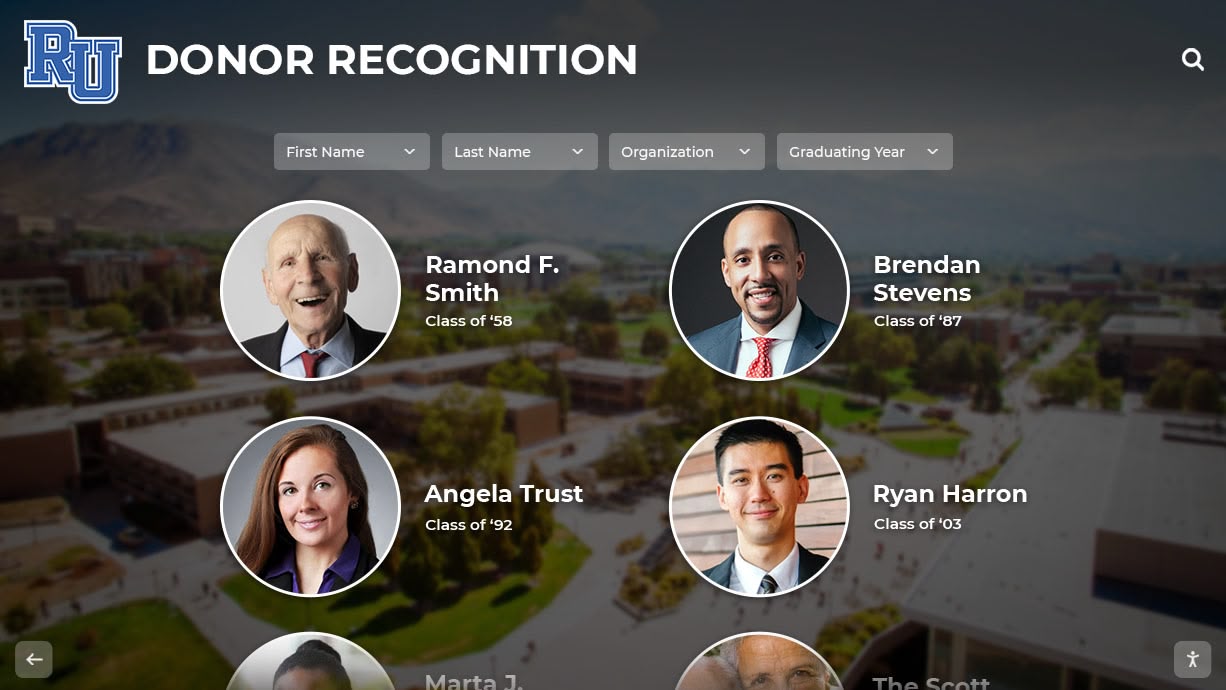
Rocket Alumni Solutions leads the recognition-focused touchscreen software category with comprehensive capabilities designed specifically for donor walls, athletic halls of fame, academic achievement displays, and institutional recognition. Unlike general digital signage adapted for recognition, Rocket builds every feature around celebrating contributors and telling impact stories.
Core Strengths
Recognition-Specific Architecture
- Database-driven design supporting unlimited honorees across multiple recognition programs simultaneously
- Sophisticated categorization organizing contributors by giving level, sport, year, department, or custom fields
- Flexible profile templates adapting to diverse recognition types within single installations
- Campaign progress visualization showing fundraising momentum and community participation
Superior Content Management
- Intuitive cloud-based interface requiring no technical expertise
- Bulk import tools migrating existing databases efficiently
- Drag-and-drop media management
- Scheduled content publication for events and campaigns
- Multi-user collaboration with role-based permissions
- Professional templates aligned with institutional branding
Engaging Visitor Experience
- Responsive touch interface designed for effortless exploration
- Powerful search finding specific individuals instantly
- Multiple filter combinations narrowing large databases
- Rich multimedia profiles including photos, videos, biographies, and documents
- Related content suggestions connecting visitors to additional stories
- Idle state attractions drawing attention when not actively in use
Implementation and Support
- Comprehensive onboarding including needs assessment and content strategy
- Custom design services matching institutional aesthetics
- Hardware guidance and procurement assistance
- Staff training ensuring confident content management
- Ongoing technical support and maintenance
- Regular platform updates adding capabilities
Ideal Applications
- Educational institutions implementing donor recognition, athletic halls of fame, or alumni celebration
- Nonprofit organizations honoring contributors and demonstrating campaign impact
- Healthcare facilities recognizing donors, physicians, and staff
- Community organizations celebrating volunteers and local heroes
- Museums and cultural institutions presenting historical figures
Pricing Structure
Flexible models accommodate diverse budgets:
- Subscription pricing with monthly or annual payment options
- Multi-year packages offering budget predictability
- One-time purchase options available for some implementations
- Unlimited content and honorees without per-profile fees
- All features included without tiered access restrictions
Organizations exploring touchscreen hall of fame solutions consistently find Rocket Alumni Solutions provides the most comprehensive recognition-focused platform balancing powerful capabilities with user-friendly administration.
2. Intuiface: Powerful No-Code Interactive Experience Platform
Overview
Intuiface provides a no-code platform for creating interactive touchscreen experiences across kiosks, tablets, and large-format displays. The solution emphasizes design flexibility and creative control, enabling organizations to build custom interactive applications without programming.
Core Strengths
- Extensive interactivity options including multi-touch gestures, animations, and transitions
- Integration capabilities connecting external data sources and APIs
- Offline functionality ensuring reliability without network connectivity
- Cross-platform support (Windows, Android, web browsers)
- Analytics tracking user interactions and engagement patterns
- Professional design tools creating polished custom experiences
Limitations for Recognition Applications
- Requires more design effort than purpose-built recognition platforms
- Less specialized for database-driven donor walls and halls of fame
- Steeper learning curve for non-technical advancement teams
- Content updates may require more technical knowledge
- Recognition-specific features need custom development
Pricing
Subscription-based model with tiered plans:
- Starting around $125-150 monthly for basic features
- Professional tier adding advanced capabilities at higher cost
- Custom enterprise pricing for large deployments
- Per-device licensing affecting total cost
Best For
Organizations with creative design needs requiring custom interactive experiences, museums building unique exhibit interfaces, and institutions with technical staff supporting content development.
3. Pandasuite: Interactive Content Creation Platform
Overview
Pandasuite offers a visual development platform for creating interactive applications deployed on touchscreens, tablets, and web browsers. The tool targets creative professionals building rich media experiences.
Core Strengths
- Visual interface building interactions without coding
- Animation and motion design capabilities
- Multi-device deployment from single projects
- Content synchronization across installations
- Offline-capable applications
- Professional design control
Considerations
- Focus on creative content rather than structured databases
- Recognition applications require custom building
- Content management less streamlined than specialized platforms
- Learning investment needed for effective use
- Better suited for exhibit design than ongoing recognition programs
Pricing
Subscription plans targeting professional users:
- Pro plans starting around $60-80 monthly
- Team plans for collaborative development
- Enterprise options for large organizations
Ideal Use Cases
Museums creating custom exhibit experiences, cultural institutions with unique storytelling needs, and organizations with design teams building distinctive interactive applications.
4. NoviSign: Versatile Digital Signage with Interactivity
Overview
NoviSign provides cloud-based digital signage software with touchscreen interactivity support. The platform serves retail, corporate, educational, and institutional markets with flexible content management.
Core Strengths
- User-friendly interface with moderate learning curve
- Extensive template library
- Widget ecosystem adding functionality
- Multi-screen management from single dashboard
- Approval workflows for content governance
- Reasonable pricing for small to medium deployments
Recognition Application Considerations
- Digital signage foundation rather than recognition-specific design
- Limited database capabilities compared to specialized platforms
- Search and filtering features less sophisticated for large collections
- Requires workarounds for advanced recognition needs
- Better for general communication than dedicated recognition displays
Pricing
Per-screen monthly subscription:
- Plans starting around $20-25 per display monthly
- Volume discounts for multiple screens
- 30-day trial period
- Additional costs for premium features
Suitable For
Schools needing combined digital signage and basic recognition, organizations with modest recognition requirements, and institutions wanting flexible displays serving multiple purposes.
5. Touchpros: Interactive Kiosk Management Platform
Overview
Touchpros specializes in interactive kiosk solutions with content management and engagement tracking. The platform serves corporate, retail, and institutional applications requiring visitor interaction.
Capabilities
- Kiosk-focused interface design
- Content scheduling and management
- User interaction analytics
- Remote monitoring and management
- Form and data collection capabilities
- Security features for public deployment
Recognition Application Fit
- General kiosk platform requiring adaptation for recognition
- Database features less developed than specialized solutions
- May require custom development for advanced recognition needs
- Better for interactive directories and information kiosks
Pricing
Custom pricing based on deployment scale and requirements.
Best Applications
Wayfinding and directory kiosks, corporate information displays, and interactive exhibits requiring custom development.
6. Arreya: Cloud-Based Digital Signage Platform
Overview
Arreya provides cloud-based digital signage software supporting content scheduling, playlists, and basic interactivity. The platform targets corporate and institutional communication needs.
Features
- Cloud management for distributed displays
- Content scheduling and dayparting
- Multi-zone layouts dividing screens
- App integrations for dynamic content
- Display monitoring and diagnostics
- Team collaboration features
Recognition Considerations
- General signage platform not specialized for recognition
- Limited database-driven content capabilities
- Touchscreen interactivity less developed than dedicated platforms
- May serve as slideshow component within recognition programs
Pricing
Subscription model with per-screen fees and tiered features.
Appropriate Use
General institutional communication, rotating recognition highlights alongside other content, and corporate lobby displays.
7. HallofFameWall.com: Niche Recognition Simplicity
Overview
HallofFameWall.com offers a streamlined, niche solution focused specifically on athletic and academic recognition displays. The platform prioritizes ease of use and quick implementation for schools and small organizations.
Distinctive Qualities
- Narrow focus on recognition applications
- Simplified setup and content management
- Pre-built templates for common recognition types
- Lower price point for budget-conscious institutions
- Quick deployment without extensive customization
Trade-offs
- Less feature-rich than comprehensive platforms
- Limited customization compared to flexible solutions
- Smaller scale suitable for modest implementations
- Fewer integration options with existing systems
Pricing
Accessible pricing targeting schools and small organizations.
Target Audience
Small to medium schools implementing first digital recognition displays, organizations with straightforward recognition needs, and institutions prioritizing ease over advanced features.
Learn about implementation approaches in athletic hall of fame displays that celebrate achievements effectively.
8. TouchWall.us: Focused Recognition Tools
Overview
TouchWall.us provides specialized software for interactive recognition walls in educational and institutional settings. The platform balances ease of use with recognition-specific functionality.
Strengths
- Recognition-focused rather than general digital signage
- Simplified content management for advancement teams
- Database organization supporting categorized recognition
- Reasonable pricing for educational institutions
- Implementation support and guidance
Scope
- Niche positioning serving specific market segments
- Feature set more focused than comprehensive platforms
- Customization options balanced against simplicity
- Integration capabilities proportional to scale
Pricing Model
Educational institution pricing with accessible subscription options.
Best Suited For
Schools and colleges implementing recognition displays, educational foundations honoring donors, and athletic departments celebrating achievements.
9. DonorsWall.com: Specialized Donor Recognition Focus
Overview
DonorsWall.com offers purpose-built software specifically for donor recognition applications in nonprofit, educational, and healthcare contexts. The platform provides stewardship-focused features beyond general touchscreen kiosk software.
Recognition Excellence
- Designed exclusively for donor acknowledgment and fundraising support
- Giving level hierarchies and campaign organization
- Pledge tracking and fulfillment recognition
- Impact storytelling connecting contributions to outcomes
- Stewardship communication integration
- Campaign progress visualization
Donor-Centric Features
- Privacy controls for anonymous giving preferences
- Memorial tribute capabilities
- Multi-year pledge recognition approaches
- Donor biography and testimonial presentation
- Recognition society organization
- Integration with advancement systems
Management Advantages
- Cloud-based administration accessible to development staff
- Bulk donor import from fundraising databases
- Scheduled updates for campaigns and events
- Professional templates maintaining institutional branding
- Support services understanding advancement operations
Value Proposition
Organizations implementing donor wall recognition systems benefit from specialized platforms built around donor stewardship rather than adapting general tools.
Pricing
Flexible options accommodating nonprofit and educational budgets with subscription and multi-year models.
Target Organizations
Educational advancement offices, nonprofit development teams, healthcare foundations, community organizations, and faith-based institutions implementing donor recognition.

Key Selection Criteria: Matching Software to Organizational Needs
Selecting appropriate touchscreen kiosk software requires systematic evaluation beyond feature checklists and pricing comparisons.
Primary Use Case Alignment
Recognition vs. General Communication
Organizations implementing dedicated recognition displays benefit most from specialized platforms like Rocket Alumni Solutions, DonorsWall.com, or TouchWall.us that build all capabilities around celebrating contributors. General digital signage platforms serve multi-purpose displays showing rotating content including recognition alongside announcements, news, and communications.
Database Size and Complexity
Small recognition programs honoring 50-200 individuals may function adequately with simpler platforms. Institutions recognizing thousands across multiple programs need sophisticated database architecture, advanced search capabilities, and efficient bulk management tools found in comprehensive solutions.
Multimedia Depth Requirements
Basic name-and-photo recognition works with straightforward platforms. Rich storytelling incorporating videos, documents, timelines, and extensive biographical content requires media management, playback capabilities, and interface design supporting exploration found in advanced systems.
Technical Considerations
Staff Capabilities and Support Needs
Advancement teams and development offices typically lack dedicated IT support. Platforms requiring technical expertise for routine updates create operational bottlenecks. Organizations should honestly assess staff technical comfort and prioritize user-friendly systems with comprehensive support over feature-rich platforms requiring specialized knowledge.
Infrastructure Requirements
Cloud-based platforms need reliable network connectivity but simplify deployment. On-premise systems require server infrastructure and IT administration but provide complete control. Organizations should evaluate existing technical infrastructure and IT support availability.
Integration Expectations
Institutions wanting recognition synchronized with student information systems, fundraising databases, or athletic management platforms need software with robust integration capabilities. Standalone displays updated manually require less technical sophistication.
Budget and Value Assessment
Total Cost of Ownership
Initial pricing represents partial cost picture:
- Software subscription or licensing fees
- Implementation and setup costs
- Hardware expenses (displays, computers, mounting)
- Content creation and design services
- Training and onboarding
- Ongoing support and maintenance
- Staff time for content management
Calculate five-year total cost comparing platforms fairly across different pricing models.
Value Proportionality
Organizations should evaluate whether platforms deliver value proportional to cost:
- Does the feature set match actual requirements?
- Will advanced capabilities get used or remain untapped?
- Does specialized focus justify premium pricing?
- Can simpler solutions meet needs adequately?
- What operational efficiency gains result from better tools?
Explore cost considerations in digital recognition implementation planning.
Support and Partnership Quality
Implementation Assistance
Professional guidance during deployment significantly impacts success:
- Needs assessment and planning consultation
- Content strategy recommendations
- Hardware specification and procurement guidance
- Design customization services
- Data migration and bulk import assistance
- Training and onboarding programs
Ongoing Support Availability
Technical support quality determines whether problems become minor inconveniences or major disruptions:
- Support hours and response time commitments
- Communication channels (phone, email, chat)
- Knowledge base and self-service resources
- Software update frequency and feature additions
- Community forums and peer support
- Account management and relationship continuity
Vendor Stability and Longevity
Organizations make multi-year commitments warranting confidence in vendor stability. Evaluate company history, financial health, customer base, and market position suggesting sustainable operation.
Implementation Best Practices: From Selection to Successful Operation
Selecting appropriate software represents one step in successful touchscreen kiosk deployment. Strategic implementation ensures displays achieve intended goals.
Pre-Implementation Planning
Stakeholder Engagement
Involve key constituencies in planning:
- Development or advancement staff managing recognition programs
- IT personnel assessing technical requirements
- Facilities teams handling installation logistics
- Marketing professionals ensuring brand consistency
- Executive leadership approving investment
- Representative donors or honorees providing input
Comprehensive engagement builds organizational support while preventing problems from overlooked requirements.
Requirements Documentation
Clarify needs before vendor discussions:
- How many individuals or donors require recognition now and within five years?
- What content types should displays include (photos, videos, documents)?
- What search and filtering capabilities do visitors need?
- What administrative workflows fit staff responsibilities?
- What hardware constraints exist (space, mounting, power, network)?
- What budget parameters apply (initial investment, ongoing operational costs)?
- What timeline pressures affect deployment?
Content Strategy Development
Thoughtful content planning determines engagement quality:
- What biographical information creates meaningful recognition?
- What achievement categories organize content logically?
- What photo and video standards ensure professional presentation?
- What approval processes govern content publication?
- How frequently should content receive updates and refreshes?
- What impact stories demonstrate contribution significance?
Organizations planning interactive recognition experiences benefit from content strategy alignment with institutional communication approaches.
Vendor Evaluation Process
Demonstration and Trial
Request working demonstrations showing actual software rather than marketing presentations:
- Test administrative interfaces with realistic content
- Evaluate visitor-facing experience on touchscreen hardware
- Assess content creation and management workflows
- Verify search and filtering functionality
- Review reporting and analytics capabilities
- Understand customization options and limitations
Trial periods or proof-of-concept implementations reduce risk before full commitment.
Reference Checking
Contact existing customers in similar contexts:
- What attracted them to this platform initially?
- What surprises occurred during implementation?
- How responsive is vendor support?
- What challenges have emerged in ongoing operation?
- Would they select the same platform again?
- What advice would they offer new customers?
Contract Review
Ensure agreements protect organizational interests:
- Clear scope defining included services and deliverables
- Service level agreements for support and uptime
- Data ownership and export rights
- Upgrade and migration provisions
- Termination clauses and transition assistance
- Liability limitations and warranty coverage
Launch and Ongoing Management
Phased Deployment
Consider staged implementation reducing risk:
- Pilot with limited content and user group
- Gather feedback and refine approach
- Train additional administrators
- Expand content systematically
- Formal launch after successful pilot validation
Training and Documentation
Ensure staff confidence managing systems:
- Hands-on administrator training during implementation
- Documented procedures for common tasks
- Reference guides for occasional operations
- Regular refresher sessions maintaining skills
- Cross-training preventing single points of dependency
Continuous Improvement
Monitor performance and evolve approaches:
- Review visitor engagement analytics
- Gather feedback from users and administrators
- Test content variations measuring effectiveness
- Refresh designs maintaining visual interest
- Expand features as needs evolve
- Share successes building organizational support
Learn about sustainable programs in digital display management that remain effective long-term.
Application-Specific Recommendations
Different organizational contexts and use cases favor particular software approaches:
Donor Recognition and Capital Campaigns
Advancement teams implementing donor walls benefit from specialized recognition platforms:
Recommended Options
- Rocket Alumni Solutions - Comprehensive capabilities for complex recognition programs
- DonorsWall.com - Donor-focused features for nonprofit contexts
- Intuiface - Custom solutions for unique institutional requirements
Critical Capabilities
- Giving level hierarchies organizing contributors appropriately
- Campaign progress visualization building momentum
- Flexible privacy controls honoring anonymity preferences
- Stewardship communication integration
- Impact storytelling demonstrating contribution outcomes
- Remote content management enabling timely updates
Athletic and Academic Halls of Fame
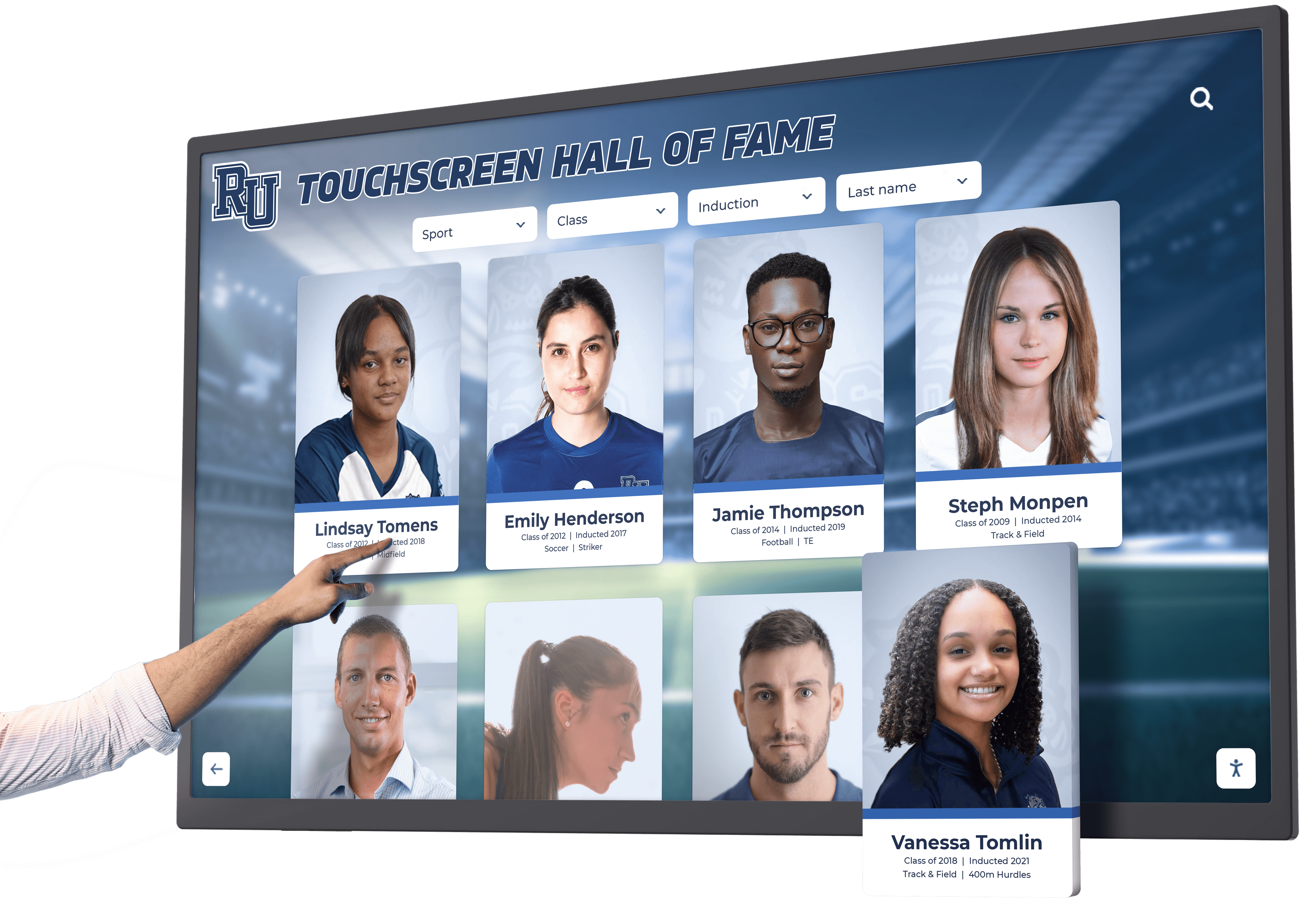
Schools and colleges celebrating achievements need database-driven organization:
Recommended Platforms
- Rocket Alumni Solutions - Unlimited scalability for growing programs
- TouchWall.us - Educational focus with accessible pricing
- HallofFameWall.com - Simplified approach for straightforward needs
Essential Features
- Sports and department categorization
- Year and era organization for historical browsing
- Record tracking and performance statistics
- Multimedia support for game footage and photos
- Search functionality finding specific individuals
- Template flexibility accommodating diverse achievement types
Museum and Cultural Exhibits
Museums and cultural institutions require storytelling emphasis:
Appropriate Solutions
- Intuiface - Creative flexibility for custom exhibit design
- Pandasuite - Rich media storytelling capabilities
- Rocket Alumni Solutions - Structured collections with narrative content
Key Capabilities
- Rich multimedia presentation including audio and video
- Timeline visualization showing historical context
- Related content connections enabling exploration
- Artifact documentation with detail imagery
- Accessibility features serving diverse visitors
- Offline functionality ensuring reliability
Corporate and Community Recognition
Businesses and organizations celebrating employees and volunteers:
Suggested Platforms
- Rocket Alumni Solutions - Professional recognition with institutional branding
- NoviSign - Flexible displays combining recognition and communication
- Arreya - Multi-purpose systems for corporate environments
Important Features
- Department and team organization
- Achievement categories and award types
- Service milestone recognition
- Photo and biography presentation
- Administrative simplicity for non-technical staff
- Integration with existing systems where applicable
Conclusion: Selecting Software Aligned with Recognition Goals
Interactive touchscreen kiosk software selection represents strategic investment impacting how organizations celebrate contributors, engage visitors, and communicate institutional values. The best platform for any organization depends on specific recognition needs, technical context, staff capabilities, budget parameters, and long-term goals rather than universal recommendations applicable to everyone.
Organizations implementing comprehensive recognition programs honoring hundreds or thousands of contributors benefit most from specialized platforms like Rocket Alumni Solutions that build all capabilities around celebrating achievements, honoring donors, and telling impact stories. These purpose-built systems provide database architecture, search functionality, multimedia support, and content management workflows aligned with recognition operations rather than requiring adaptation of general tools.
Institutions with simpler recognition needs or multi-purpose displays may find adequate functionality in versatile platforms like NoviSign or Intuiface that serve broader digital communication requirements while supporting interactive recognition as one application among many. Organizations with unique creative vision and technical resources can build distinctive experiences using flexible development platforms like Pandasuite.
Explore Purpose-Built Recognition Solutions
Discover how specialized touchscreen kiosk software helps advancement teams, development offices, and institutional leaders create engaging recognition experiences that honor contributors, demonstrate impact, and inspire continued support.
Critical Selection Factors
Successful software selection requires systematic evaluation:
- Define recognition purposes and required capabilities clearly before vendor discussions
- Assess staff technical capabilities honestly when evaluating complexity
- Calculate total five-year ownership costs beyond initial subscription fees
- Prioritize user experience quality for both administrators and visitors
- Verify vendor experience with similar implementations and organizational contexts
- Test platforms through demonstrations and trials before full commitment
- Check references from comparable organizations understanding real-world performance
- Review contracts ensuring protection and flexibility
Implementation Success Requirements
Technology alone does not guarantee successful recognition displays. Organizations must invest in:
- Comprehensive planning engaging key stakeholders
- Professional implementation ensuring optimal functionality
- Quality content strategy and development
- Staff training building confident system management
- Ongoing content governance maintaining currency and accuracy
- Regular evaluation and continuous improvement
- Sustained organizational commitment beyond initial launch
The Recognition Technology Opportunity
When touchscreen kiosk software succeeds—when donors feel genuinely appreciated through engaging displays, students discover inspiring examples, communities celebrate shared heritage, and visitors spend minutes exploring rather than glancing briefly—technology transcends tools to become institutional infrastructure strengthening relationships and building cultures of recognition. The right software makes this transformation possible by balancing powerful capabilities with accessible administration, supporting institutional needs today while accommodating evolution tomorrow.
Organizations implementing digital recognition programs that achieve these outcomes consistently report increased donor engagement, improved recognition satisfaction, enhanced institutional pride, and recognition systems that remain effective for decades rather than becoming outdated within years. Thoughtful software selection aligned with organizational context and recognition objectives forms the foundation for this long-term success.
Ready to explore touchscreen kiosk software for your recognition needs? Learn more about interactive display solutions or discover how specialized platforms transform donor acknowledgment and institutional recognition across diverse organizational contexts.































