
Museums and galleries face a fundamental challenge in the digital age: how do you make historical artifacts, artistic masterpieces, and archival materials engaging for audiences accustomed to smartphones, tablets, and instant digital access? Traditional static displays—object behind glass, placard with description—no longer satisfy visitor expectations for interaction, deeper context, and personalized exploration.
Research from museum studies shows that visitor engagement time with exhibits increases by 300-400% when interactive digital elements supplement traditional displays. Visitors spend an average of 15-20 seconds viewing static exhibits, but will engage with well-designed interactive touchscreens for 3-5 minutes or longer, absorbing substantially more information while reporting higher satisfaction with their museum experience.
This comprehensive guide explores how interactive touchscreens transform museum and gallery experiences, examining technology options, implementation strategies, content approaches, accessibility considerations, and practical frameworks for cultural institutions seeking to modernize exhibits while preserving educational mission and curatorial integrity.
Cultural institutions that successfully integrate interactive technology create deeper visitor connections with collections, expand storytelling beyond physical space limitations, accommodate diverse learning styles and accessibility needs, and build sustainable digital infrastructure serving communities for decades. Digital recognition and exhibition platforms like those from Rocket Alumni Solutions provide museums and galleries with flexible systems that honor the past while embracing contemporary visitor expectations.

Interactive touchscreens enable museums and galleries to deliver rich multimedia experiences that static displays cannot match
Why Interactive Touchscreens Matter for Museums and Galleries
Understanding the specific benefits interactive technology brings to cultural institutions helps organizations make informed decisions about digital exhibit investments.
The Evolution of Museum Visitor Expectations
Museum visitors in 2026 arrive with fundamentally different expectations than previous generations, shaped by ubiquitous digital technology in daily life:
Changing Visitor Behaviors
- Expectation for interactive engagement rather than passive observation
- Desire for personalized experiences allowing individual exploration paths
- Preference for multimedia storytelling combining images, video, audio, and text
- Need for accessibility accommodations across physical and cognitive abilities
- Interest in social sharing and digital documentation of museum experiences
- Shorter attention spans requiring engaging content to maintain focus
These shifts create challenges for museums relying exclusively on traditional exhibit design. Visitors spending minimal time with displays, skipping lengthy text panels, and leaving without deeper engagement represents missed opportunities for education, connection, and relationship-building that supports future visits and donations.
The Interactive Touchscreen Solution
Interactive touchscreens address these challenges through technology enabling self-directed exploration at individual pace, multimedia presentation accommodating different learning styles, layered information allowing surface viewing or deep research, accessible design meeting ADA and universal design standards, social features encouraging sharing and discussion, and data collection informing future exhibit development.
Cultural institutions implementing interactive touchscreens report significant improvements in visitor dwell time, educational outcomes, accessibility compliance, and visitor satisfaction metrics that correlate with membership renewals and philanthropic support.
Core Benefits for Cultural Institutions
Museums and galleries implementing interactive touchscreen technology experience benefits across multiple institutional priorities:
Enhanced Visitor Engagement
Interactive touchscreens create engagement static displays cannot match. Visitors control their experience through searchable interfaces finding relevant content instantly, multimedia presentations offering richer context than text alone, interactive maps connecting artifacts to historical locations and contexts, virtual artifact manipulation allowing close examination impossible with physical displays, and personalized learning paths accommodating expert and novice visitors equally.
This self-directed exploration increases average visitor dwell time substantially. When visitors spend more time engaged with content, they retain more information, form stronger connections with institutions, and develop relationship foundations supporting membership, repeat visits, and philanthropic giving.
Unlimited Content Capacity
Physical space constraints limit traditional museum displays to small fractions of collections. Most museums display only 2-5% of holdings, with remaining artifacts in storage inaccessible to public audiences. Interactive touchscreens overcome these limitations by providing unlimited digital capacity for entire collections, detailed artifact information beyond what physical labels accommodate, archival photographs and documents complementing physical exhibits, video interviews with curators, conservators, and subject experts, and related materials connecting individual objects to broader historical contexts.
This expanded capacity enables museums to share entire collections digitally while maintaining careful physical curation, creating value for serious researchers and casual visitors alike.
Learn more about displaying historical content and archives through digital systems that preserve institutional memory while enabling contemporary access.

Intuitive touchscreen interfaces make exploring museum collections natural and engaging for visitors of all ages
Accessibility and Universal Design
Interactive touchscreens enable accessibility features difficult or impossible to provide through traditional exhibits including adjustable text size accommodating visual impairments, audio descriptions for visitors who are blind or have low vision, multiple language options serving diverse communities, high-contrast display modes for various visual needs, and wheelchair-accessible placement and interface design.
These features ensure museums fulfill legal accessibility obligations while creating genuinely inclusive experiences that welcome all community members. Cultural institutions report that accessibility improvements benefit all visitors, not just those with disabilities, by offering choice and flexibility in how people engage with content.
Cost-Effective Content Updates
Traditional museum exhibits require expensive physical modifications when updating content, adding new acquisitions, or correcting information. Interactive touchscreens enable remote content management allowing instant updates across multiple displays, seasonal or rotating content maintaining visitor interest, corrections and additions without physical reinstallation, and special programming for temporary exhibits or events.
This flexibility reduces long-term operating costs while enabling more dynamic programming that responds to visitor interests, current events, and new scholarship. Museums report that content update capabilities justify digital investment within 3-5 years through eliminated physical modification costs.
Data and Analytics for Exhibit Design
Interactive touchscreens provide valuable data about visitor behavior including which content attracts most interest, how long visitors engage with different topics, common navigation patterns and content discovery paths, accessibility feature usage, and demographic information about peak visiting times.
This data informs future exhibit design, collection development priorities, educational programming, and marketing strategies. Understanding what engages visitors enables museums to allocate limited resources more effectively while building experiences that serve community interests.
Types of Interactive Touchscreen Systems for Museums
Understanding available technology options helps cultural institutions select systems matching institutional needs, collections, and visitor profiles.
Freestanding Kiosk Systems
Freestanding touchscreen kiosks represent the most common interactive exhibit format in museums and galleries:
Advantages of Kiosk Systems
- Flexible placement anywhere in gallery spaces without wall mounting
- Self-contained units requiring minimal installation beyond power
- Available in various sizes from tablet-scale to large-format displays
- Easily repositioned for exhibit changes or space reconfigurations
- Clear physical presence signaling interactivity to visitors
- Integration with existing exhibits without structural modifications
Kiosk systems work well for directory and wayfinding applications, collection databases enabling visitor search, interactive timelines connecting artifacts across periods, multimedia presentations with video and audio, and complementary content expanding on physical exhibits.
Museums typically deploy kiosks in high-traffic areas including entrance lobbies for orientation, gallery centers as focal points, exhibition transitions between themed areas, and research alcoves for serious study.
Design Considerations for Museum Kiosks
Effective museum kiosks balance functionality with aesthetic integration including finishes and materials complementing institutional architecture, appropriate sizing for gallery scale and viewing distances, ADA-compliant height and reach ranges, anti-glare screens for varied lighting conditions, and durable construction withstanding high-volume public use.
Well-designed kiosks feel like intentional exhibition elements rather than technological afterthoughts, supporting curatorial vision while enabling enhanced functionality.
Explore interactive display technology applications that translate effectively to museum and cultural institution environments.
Wall-Mounted Display Systems
Wall-mounted touchscreens offer alternative installation approaches for specific museum contexts:
Benefits of Wall-Mounted Displays
- Space efficiency in galleries with limited floor area
- Integration directly adjacent to related physical exhibits
- Multiple sizes from small interpretive panels to large-format digital walls
- Cleaner aesthetic without freestanding furniture elements
- Protection from accidental damage in high-traffic areas
- Ability to create connected multi-screen experiences
Wall-mounted systems work particularly well for digital labels providing detailed object information, interactive maps showing geographical or chronological contexts, before-and-after conservation documentation, artist or curator interviews explaining creative processes, and immersive experiences creating sense of place.
Museums implementing wall-mounted displays report that proximity to related physical objects strengthens connections between digital and traditional exhibit elements, creating unified experiences rather than separate analog and digital components.

Contemporary touchscreen systems balance technological functionality with design aesthetics appropriate for cultural institutions
Tabletop and Collaborative Systems
Horizontal tabletop touchscreens create collaborative exploration opportunities particularly valuable for educational programming:
Collaborative Touchscreen Applications
- Multi-user interaction enabling group exploration and discussion
- Object arrangement activities organizing artifacts by themes or periods
- Puzzle and matching games for educational programming
- Collection comparison examining multiple objects simultaneously
- Family and school group activities encouraging social learning
Tabletop systems excel in dedicated education spaces, family learning areas, temporary exhibit special programming, and research rooms for serious scholars.
The horizontal format creates natural gathering spaces encouraging conversation and collaborative meaning-making that enhances learning outcomes and social visitor experiences museums increasingly prioritize.
Mobile Device Integration
Some museums supplement dedicated touchscreens with mobile device integration:
Mobile-Enhanced Experiences
- Personal device apps providing customized tours and content
- QR codes linking physical objects to digital resources
- Location-aware content triggering at specific gallery positions
- Social sharing features extending museum experiences beyond visits
- Accessibility features leveraging personal device settings
Mobile integration works best as complement to rather than replacement for dedicated touchscreens, acknowledging that not all visitors have appropriate devices, cellular service may be limited in museum buildings, and some visitors prefer not to use personal devices during cultural experiences.
Hybrid approaches offering both dedicated touchscreens and mobile options accommodate diverse visitor preferences while ensuring equitable access regardless of personal technology ownership.
Content Strategies for Museum Interactive Touchscreens
Technology provides the delivery mechanism, but compelling content creates meaningful visitor experiences that fulfill educational missions.
Layered Information Architecture
Effective museum touchscreen content provides information at multiple depth levels accommodating different visitor needs:
Information Hierarchy Design
- Surface level: brief introductions capturing attention in 10-15 seconds
- Mid-level: moderate detail for interested general audiences (1-2 minutes)
- Deep level: comprehensive information for serious researchers (5-15 minutes)
- Specialized content: curator notes, conservation details, scholarly references
This layered approach allows casual visitors to engage briefly without overwhelming detail while enabling passionate learners to explore deeply according to individual interest. Well-designed interfaces make transitioning between levels intuitive through clear navigation and visual hierarchy.
Museums implementing layered content report higher satisfaction across diverse visitor segments, with novices appreciating accessible introductions while experts value access to detailed information typically unavailable in traditional exhibits.
Multimedia Storytelling Approaches
Interactive touchscreens enable rich multimedia presentations combining multiple content types:
Effective Multimedia Elements
- High-resolution object photography enabling close examination
- Video interviews with curators, artists, conservators, and community members
- Audio recordings including oral histories, music, and environmental sounds
- Archival documents, letters, photographs, and ephemera
- 3D object scans allowing virtual manipulation and viewing from all angles
- Historical maps and diagrams providing geographical and spatial context
- Interactive timelines connecting artifacts across historical periods
The most effective museum touchscreen content combines these elements strategically rather than including multimedia for its own sake. Each content type should serve clear educational purposes, with video explaining processes difficult to capture in text, audio providing personal testimonies, and interactive elements enabling exploration impossible through passive observation.
Consider how digital storytelling approaches used in educational contexts translate to museum and gallery applications.
Personalization and Visitor Choice
Interactive systems enable personalized experiences accommodating individual interests and learning preferences:
Personalization Strategies
- Visitor profile creation at session start selecting interests and experience level
- Recommended content based on previous selections
- Custom tour creation letting visitors build personalized paths
- Bookmarking and favorites for later reference or follow-up
- Multiple language options serving diverse communities
- Accessibility preferences applying across entire visit
Personalization increases visitor engagement by ensuring content relevance and preventing information overload. When visitors feel exhibits speak to their specific interests, they spend more time exploring and retain more information than with one-size-fits-all presentations.
Some museums provide email or digital access to bookmarked content after visits, extending educational experiences beyond physical museum time while building relationships supporting membership and return visits.
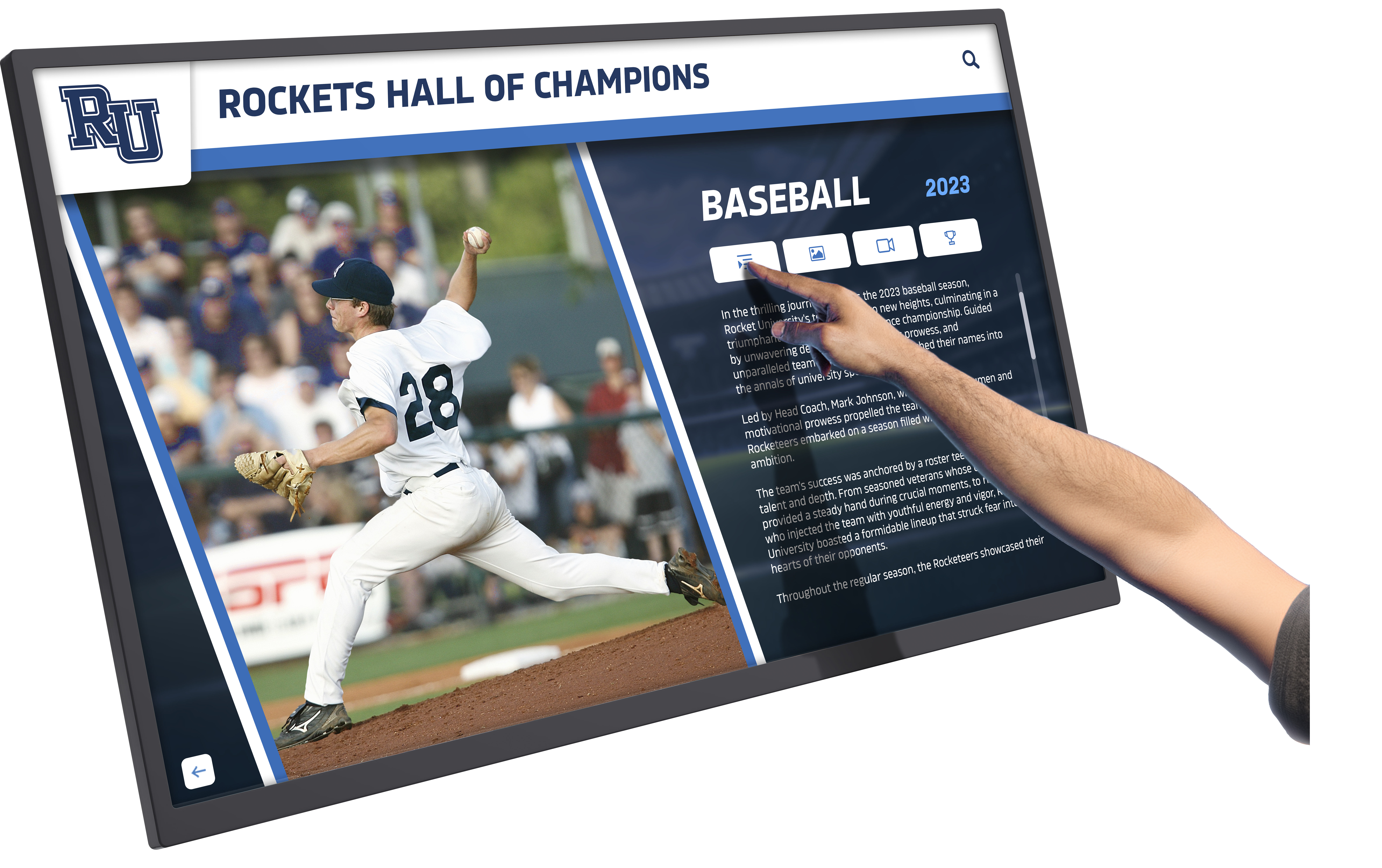
Well-designed touchscreen interfaces provide intuitive navigation that feels natural for visitors unfamiliar with specific museum content
Collection Database Integration
Providing searchable access to entire museum collections represents one of the most valuable touchscreen applications:
Collection Database Features
- Full collection search by keyword, period, artist, medium, or theme
- Advanced filtering narrowing results by multiple criteria
- Object detail pages with comprehensive information and imagery
- Related object suggestions connecting artifacts thematically
- Collection statistics and visualizations showing holdings overview
- “Not currently on display” designations for stored objects
Collection databases serve both casual visitors curious about specific topics and serious researchers requiring comprehensive access. Making entire collections discoverable increases perceived museum value while supporting scholarship that enhances institutional reputation.
Some museums report that collection database usage has identified patron interest in stored objects, informing exhibit rotation decisions and creating opportunities for targeted donor cultivation around bringing specific objects into public display.
Implementation Best Practices for Cultural Institutions
Successful touchscreen implementation requires careful planning addressing technical, curatorial, and operational considerations.
Strategic Planning and Needs Assessment
Before selecting technology, museums should conduct thorough planning processes:
Key Planning Questions
- What educational outcomes should interactive exhibits support?
- Which collections or themes benefit most from interactive treatment?
- What visitor segments require special accessibility accommodations?
- How will interactive systems integrate with existing exhibit design?
- What content creation resources and expertise are available?
- How will systems be maintained and content updated over time?
- What budget is available for initial implementation and ongoing operations?
Answering these questions before technology selection ensures that solutions align with institutional priorities rather than adopting technology for its own sake. The most successful museum digital initiatives begin with clear educational and visitor experience goals, then select technology serving those objectives.
Technology Selection Criteria
Museums should evaluate interactive touchscreen systems across multiple dimensions:
Technical Evaluation Factors
- Display quality and resolution appropriate for high-resolution imagery
- Touchscreen responsiveness and accuracy for precise interaction
- Durability for high-volume public use in varied conditions
- Accessibility features meeting ADA and universal design standards
- Content management systems enabling staff updates without technical expertise
- Analytics capabilities providing visitor behavior insights
- Total cost of ownership including hardware, software, installation, and maintenance
- Vendor support quality and long-term viability
Many museums find that working with vendors experienced in cultural institution applications provides better results than general digital signage suppliers, as museum-specific needs around accessibility, content complexity, and aesthetic integration require specialized expertise.
Organizations like Rocket Alumni Solutions understand cultural institution requirements, providing flexible platforms that accommodate complex collections while maintaining intuitive visitor experiences and accessible content management for museum staff.
Content Development Workflows
Creating effective interactive content requires dedicated resources and expertise:
Content Creation Considerations
- Curatorial input ensuring accuracy and appropriate interpretation
- Multimedia production including photography, videography, and audio recording
- Writing adapted for screen reading and scannable formatting
- Accessibility review including alt text, captions, and audio descriptions
- Testing with representative visitor groups before final implementation
- Translation for multilingual institutions or diverse communities
- Copyright clearance for images, video, music, and other media
Museums typically underestimate content creation effort required for interactive exhibits. While technology enables unlimited content capacity, producing high-quality multimedia materials requires significant time and resources. Successful institutions build realistic timelines and budgets acknowledging this work.
Some museums phase interactive implementation, starting with core collection highlights then expanding coverage as resources allow, rather than attempting comprehensive coverage immediately.
Explore digital archive and preservation approaches that support long-term cultural institution missions while enabling contemporary access.
Accessibility and Universal Design
Ensuring interactive exhibits serve all visitors represents both legal requirement and ethical imperative:
Essential Accessibility Features
- Wheelchair-accessible mounting heights and clear floor space
- Alternative text descriptions for all images
- Video captions and transcripts for audio content
- High-contrast display modes for low vision
- Adjustable text sizes accommodating visual impairments
- Simple language options for cognitive accessibility
- Intuitive navigation requiring minimal instruction
The most effective approach treats accessibility as central design consideration from project inception rather than compliance checklist applied after development. Universal design principles creating broadly usable systems benefit all visitors, not just those with disabilities.
Museums should test accessibility features with diverse users including people with various disabilities, older adults, and children, gathering feedback informing refinements before final deployment.
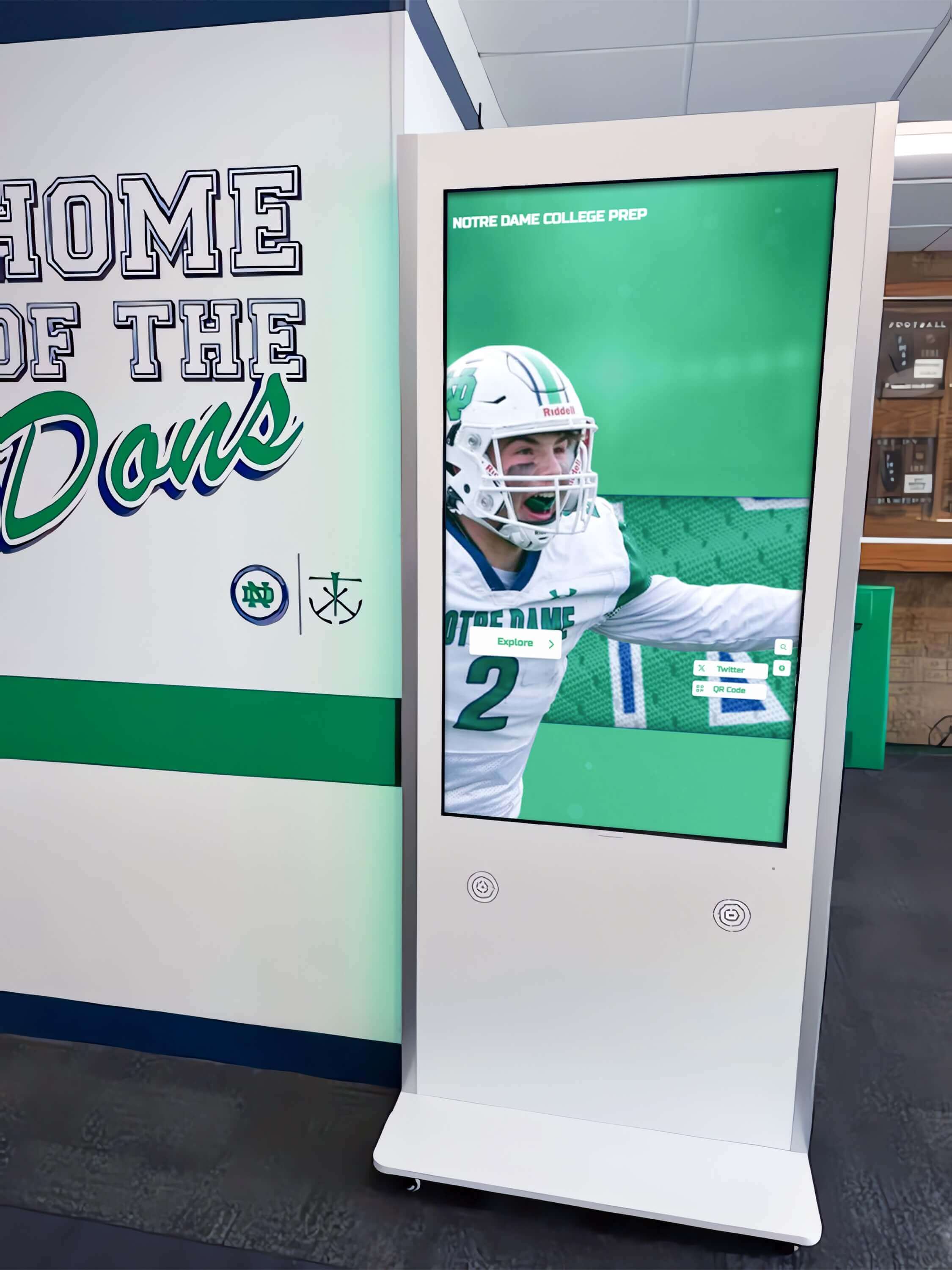
Institutional touchscreen installations require careful attention to placement, accessibility, and integration with existing architecture
Overcoming Common Museum Touchscreen Challenges
Understanding typical implementation challenges helps institutions plan proactively to avoid common pitfalls.
Balancing Technology and Artifacts
One concern among museum professionals involves technology overwhelming or distracting from physical collections:
Thoughtful Technology Integration
- Position touchscreens complementing rather than competing with artifacts
- Design interfaces reflecting institutional aesthetic and curatorial voice
- Limit screen brightness and motion to avoid visual distraction
- Use technology to direct attention toward physical objects, not away
- Ensure digital content supports rather than replaces object engagement
Well-integrated technology feels like natural exhibition component rather than jarring intrusion. Museums achieving this balance report that touchscreens increase rather than decrease physical object engagement by providing context making artifacts more meaningful and accessible.
Managing Maintenance and Technical Support
Interactive exhibits require ongoing maintenance and support:
Operational Considerations
- Daily checks ensuring systems function properly before opening
- Cleaning protocols for touchscreens receiving frequent contact
- Hardware replacement planning for eventual component failure
- Software updates maintaining security and functionality
- Staff training for basic troubleshooting and visitor assistance
- Technical support arrangements for problems beyond staff expertise
Museums should budget for ongoing operational costs including maintenance contracts, staff time, and eventual hardware replacement. Systems requiring specialized technical expertise for routine operations typically fail as staff struggle to maintain them without adequate support.
The most sustainable approaches use reliable hardware with proven durability, intuitive content management requiring minimal training, and responsive vendor support addressing issues quickly when they arise.
Addressing Digital Preservation
While touchscreens provide current visitor engagement, museums must consider long-term digital content preservation:
Digital Preservation Planning
- Content storage in standard formats ensuring long-term accessibility
- Migration planning as technology standards evolve
- Documentation of interactive exhibit functionality for future reference
- Metadata standards enabling content discovery and reuse
- Backup systems protecting against data loss
- Rights management clarifying usage permissions for all content
Museums with strong digital preservation programs treat interactive exhibit content as valuable institutional assets requiring same care as physical collections, ensuring today’s digital experiences remain accessible to future generations and researchers.
Measuring Success and Visitor Impact
Evaluating interactive touchscreen effectiveness helps institutions refine implementations and demonstrate value to stakeholders.
Key Performance Indicators
Museums should track multiple metrics assessing interactive exhibit performance:
Quantitative Metrics
- Usage rates measuring how many visitors engage with touchscreens
- Dwell time showing average engagement duration
- Content interaction patterns revealing popular topics and features
- Return usage indicating visitors accessing systems multiple times
- Accessibility feature adoption showing accommodation usage
- Technical performance including uptime and error rates
These metrics provide objective data about system performance and visitor behavior, informing content refinements and identifying successful approaches worth expanding.
Qualitative Assessment
Numbers tell part of the story, but qualitative feedback provides deeper understanding:
Qualitative Evaluation Methods
- Visitor observation noting behavior, comments, and interaction patterns
- Exit surveys gathering satisfaction feedback and suggestions
- Focus groups with diverse visitor segments exploring experiences
- Staff feedback from docents and educators observing visitor engagement
- Social media monitoring capturing visitor comments and shares
Combining quantitative and qualitative assessment creates comprehensive understanding of how interactive exhibits affect visitor experiences, educational outcomes, and institutional mission fulfillment.
Museums should plan evaluation from project inception, establishing baseline metrics before implementation and tracking changes over time to demonstrate impact and return on investment.
Continuous Improvement
The most successful museum touchscreen implementations treat systems as evolving platforms requiring ongoing refinement:
Iterative Development Approach
- Regular content updates based on visitor behavior data
- Interface refinements addressing usability issues
- Expanded content coverage as resources allow
- Seasonal or special programming maintaining visitor interest
- Accessibility improvements responding to user feedback
- Technical upgrades extending system capabilities over time
This continuous improvement approach maximizes long-term value from interactive investments while keeping experiences fresh for repeat visitors and maintaining staff engagement with systems as active tools rather than static installations.
Learn about interactive touchscreen software options that support museums’ need for flexibility and ongoing content evolution.

Successful touchscreen implementations create natural visitor engagement points that improve rather than distract from core museum experiences
Special Applications for Archives and Special Collections
Archives and special collections face unique challenges that interactive touchscreens address effectively.
Fragile Materials and Conservation
Many archival materials are too fragile for regular handling or display:
Digital Access Solutions
- High-resolution scans enabling close examination without physical contact
- Virtual page-turning experiences simulating book and manuscript handling
- Zoomable images revealing details invisible to naked eye
- Conservation documentation showing object condition and treatments
- “Closed when not displayed” notes explaining storage decisions
Interactive touchscreens make rare and fragile materials accessible to broad audiences while protecting physical objects from handling damage and light exposure that accelerates deterioration. Researchers and casual visitors alike benefit from digital access enabling thorough examination impossible with physical materials.
Contextualizing Primary Sources
Archives contain primary sources requiring significant context for public understanding:
Interpretive Features
- Transcriptions of handwritten or difficult-to-read documents
- Historical background explaining document significance
- Biographical information about creators and subjects
- Related materials connecting documents to broader collections
- Scholarly annotations providing expert interpretation
- Educational resources supporting classroom use
These interpretive layers make archival materials accessible to non-specialist audiences while preserving scholarly rigor that serves serious researchers. Interactive formats enable both surface introduction and deep scholarly engagement through layered information architecture.
Connecting Archives to Community History
Local history archives hold particular power when connected to community identity:
Community Engagement Features
- Neighborhood maps linking documents to geographical locations
- Family history resources supporting genealogical research
- Oral history collections preserving community voices
- Historical photograph galleries showing community evolution
- “Submit your story” features inviting community contribution
- School and organization histories celebrating local institutions
These connections transform archives from specialized research facilities into community resources that preserve collective memory and strengthen local identity. Interactive touchscreens make these connections accessible and engaging for community members who might never consult traditional archival finding aids.
Consider approaches for preserving and displaying historical content that balance accessibility with proper archival stewardship.
Future Trends in Museum Interactive Technology
Understanding emerging trends helps institutions plan implementations with longevity and flexibility for future capabilities.
Artificial Intelligence and Machine Learning
AI technologies increasingly enable sophisticated museum applications:
Emerging AI Applications
- Personalized content recommendations based on visitor interests
- Visual search enabling object discovery through image similarity
- Automated image tagging and metadata enhancement
- Chatbot guides answering visitor questions conversationally
- Pattern recognition identifying connections across collections
- Accessibility improvements including automated image description
While AI remains emerging in cultural institutions, early implementations show promise for enhancing both visitor experiences and staff efficiency in content management and discovery.
Augmented and Mixed Reality
AR and mixed reality technologies offer new storytelling possibilities:
AR Museum Applications
- Artifact reconstruction showing objects in original contexts
- Historical scene recreation placing objects in period environments
- Size and scale comparisons for large objects or architecture
- Hidden detail revelation showing internal structures
- Conservation process visualization
- Temporal transformation showing objects across time
These immersive experiences create emotional connections with collections that traditional displays struggle to achieve, particularly for younger visitors accustomed to interactive digital media.
Social and Collaborative Features
Museums increasingly recognize social aspects of visitor experiences:
Social Engagement Features
- Collaborative exploration enabling group interaction with shared screens
- Social media integration for sharing discoveries and favorites
- Community contribution inviting visitor stories and connections
- Discussion forums connecting visitors with shared interests
- Virtual visit options for remote audiences
- Educational programming supporting classroom connections
These social features extend museum experiences beyond individual visits while building communities of interest that support institutional missions and create loyal audiences for programs, membership, and support.
Data Analytics and Visitor Intelligence
Sophisticated analytics provide deeper understanding of visitor behavior:
Advanced Analytics Applications
- Heat mapping showing physical and digital visitor pathways
- Engagement pattern analysis revealing content effectiveness
- Demographic analysis understanding audience composition
- Predictive modeling forecasting attendance and program interest
- A/B testing comparing content and interface alternatives
- Long-term trend analysis tracking visitor behavior evolution
These capabilities enable evidence-based decision making about exhibit design, programming, marketing, and resource allocation, improving institutional effectiveness while demonstrating impact to funders and stakeholders.

Contemporary touchscreen interfaces support sophisticated content organization while maintaining intuitive navigation for diverse audiences
Budget Planning for Museum Touchscreen Projects
Understanding cost factors helps institutions develop realistic budgets and funding strategies.
Initial Investment Components
Interactive touchscreen projects involve multiple cost categories:
Upfront Costs
- Hardware including displays, computers, mounting systems, and peripherals
- Software licensing for content management and interactive applications
- Content development including media production and writing
- Installation including electrical work, mounting, and configuration
- Project management coordinating vendors and internal stakeholders
- Accessibility testing and refinement
- Staff training on content management and operation
Museums should expect substantial initial investment, with costs varying widely based on system scale, content complexity, and feature sophistication. Simple single-kiosk installations may cost $15,000-30,000, while comprehensive gallery-wide systems can exceed $100,000-250,000.
Ongoing Operational Costs
Sustainable implementations require budget for continued operation:
Recurring Expenses
- Software licensing and hosting fees
- Maintenance contracts for hardware support
- Content updates and additions
- Staff time for content management and visitor assistance
- Electrical costs for operation
- Cleaning supplies and routine maintenance
- Eventual hardware replacement (typically 5-7 year cycle)
Museums should budget 10-20% of initial investment annually for ongoing operations, with actual costs varying based on system complexity and usage intensity.
Funding Strategies
Museums employ various approaches to fund interactive projects:
Funding Sources
- Capital campaign allocations for major renovations
- Technology-specific grants from foundations and agencies
- Corporate sponsorships from technology companies
- Donor-funded memorial or recognition opportunities
- Museum endowment distributions for mission-critical initiatives
- Revenue from admissions, memberships, and programs
Many successful projects combine multiple funding sources, with initial capital funded through grants or campaigns while operational costs covered through operating budget allocations or endowment support.
Some museums find that interactive touchscreen projects attract funding more readily than traditional exhibits, as donors appreciate technology visibility and perceive digital initiatives as forward-thinking investments in institutional futures.
Case Study Considerations: Learning from Museum Experience
While specific organizational examples are beyond this guide’s scope, museums implementing interactive touchscreens consistently report several patterns:
Common Success Factors
- Strong institutional commitment from leadership and curators
- Adequate funding for both implementation and ongoing operations
- Early visitor input during design and development
- Iterative approach starting small then expanding based on learning
- Vendor partnerships with cultural institution expertise
- Staff training and support for content management
- Regular evaluation and continuous improvement
Institutions experiencing challenges typically underestimated content development effort, selected technology without adequate accessibility features, failed to budget for ongoing maintenance, treated systems as one-time projects rather than evolving platforms, or implemented technology without clear educational objectives.
Learning from both successes and challenges helps museums approach interactive projects with realistic expectations and planning that positions implementations for long-term success.
Getting Started: Steps for Museum Touchscreen Implementation
Museums ready to explore interactive touchscreens should follow systematic planning processes:
Phase 1: Discovery and Planning
Begin with thorough assessment of needs, opportunities, and constraints:
- Define educational objectives and visitor experience goals
- Identify collections or themes benefiting from interactive treatment
- Assess physical spaces and installation requirements
- Evaluate internal resources and expertise
- Research vendors with cultural institution experience
- Develop preliminary budget and funding strategy
- Engage stakeholders including curators, educators, and board members
This planning phase typically requires 2-4 months but provides foundation for successful implementation by ensuring alignment around objectives and realistic understanding of requirements.
Phase 2: Vendor Selection and Design
With clear objectives established, engage vendors and develop detailed plans:
- Issue requests for proposals to qualified vendors
- Evaluate proposals against technical and educational criteria
- Check references with similar cultural institutions
- Develop detailed content and functionality specifications
- Create design mockups and prototypes
- Test prototypes with representative visitors
- Finalize contracts and implementation timelines
This phase typically requires 3-6 months, with timeline varying based on project complexity and procurement processes.
Phase 3: Content Development and Installation
Execute implementation with careful attention to quality and accessibility:
- Produce multimedia content including writing, photography, and video
- Develop interactive functionality and navigation systems
- Conduct accessibility review and testing
- Fabricate and install hardware components
- Configure software and load content
- Test all systems thoroughly before public launch
- Train staff on operation and content management
Content development often represents most time-intensive phase, requiring 4-8 months depending on scope and available resources.
Phase 4: Launch and Evaluation
Deploy systems with evaluation framework supporting continuous improvement:
- Soft launch allowing staff familiarization before public promotion
- Visitor orientation materials explaining interactive features
- Monitoring for technical issues requiring adjustment
- Gathering visitor feedback through surveys and observation
- Analyzing usage data and engagement metrics
- Identifying refinements and improvements
- Planning ongoing content development and evolution
Treat launch as beginning of interactive exhibit lifecycle rather than conclusion of project, with evaluation informing continuous refinement supporting long-term success.
Organizations ready to explore interactive touchscreen options for museums, galleries, or cultural institutions can book a demo to see how flexible digital platforms support diverse institutional needs while providing accessible content management and visitor engagement features.
Conclusion: Interactive Technology as Museum Mission Enabler
Interactive touchscreens represent more than technological modernization—they enable cultural institutions to fulfill educational and community missions more effectively than traditional approaches alone allow. By combining physical collections with digital interactivity, museums and galleries create experiences that serve diverse audiences, make entire collections accessible, accommodate varied learning styles and accessibility needs, and build sustainable digital infrastructure serving communities for generations.
The most successful implementations treat interactive technology as tool serving institutional missions rather than ends in themselves, with educational objectives and visitor experience driving technology selection and content development. When museums approach interactive exhibits with clear vision, adequate resources, and commitment to accessibility and quality, they create meaningful visitor experiences that strengthen institutional relevance while preserving and sharing cultural heritage in ways that honor the past while embracing contemporary expectations.
Cultural institutions beginning interactive touchscreen exploration should start with thorough planning, engage experienced vendors understanding museum-specific needs, budget realistically for both implementation and operations, prioritize accessibility and universal design, develop compelling content serving educational missions, and commit to continuous improvement based on visitor feedback and usage data.
Interactive touchscreens offer museums and galleries powerful tools for achieving core missions of education, accessibility, and community engagement. Institutions implementing these systems thoughtfully create visitor experiences that inspire curiosity, support learning, strengthen community connections, and build sustainable futures for cultural institutions serving diverse audiences for decades to come.































