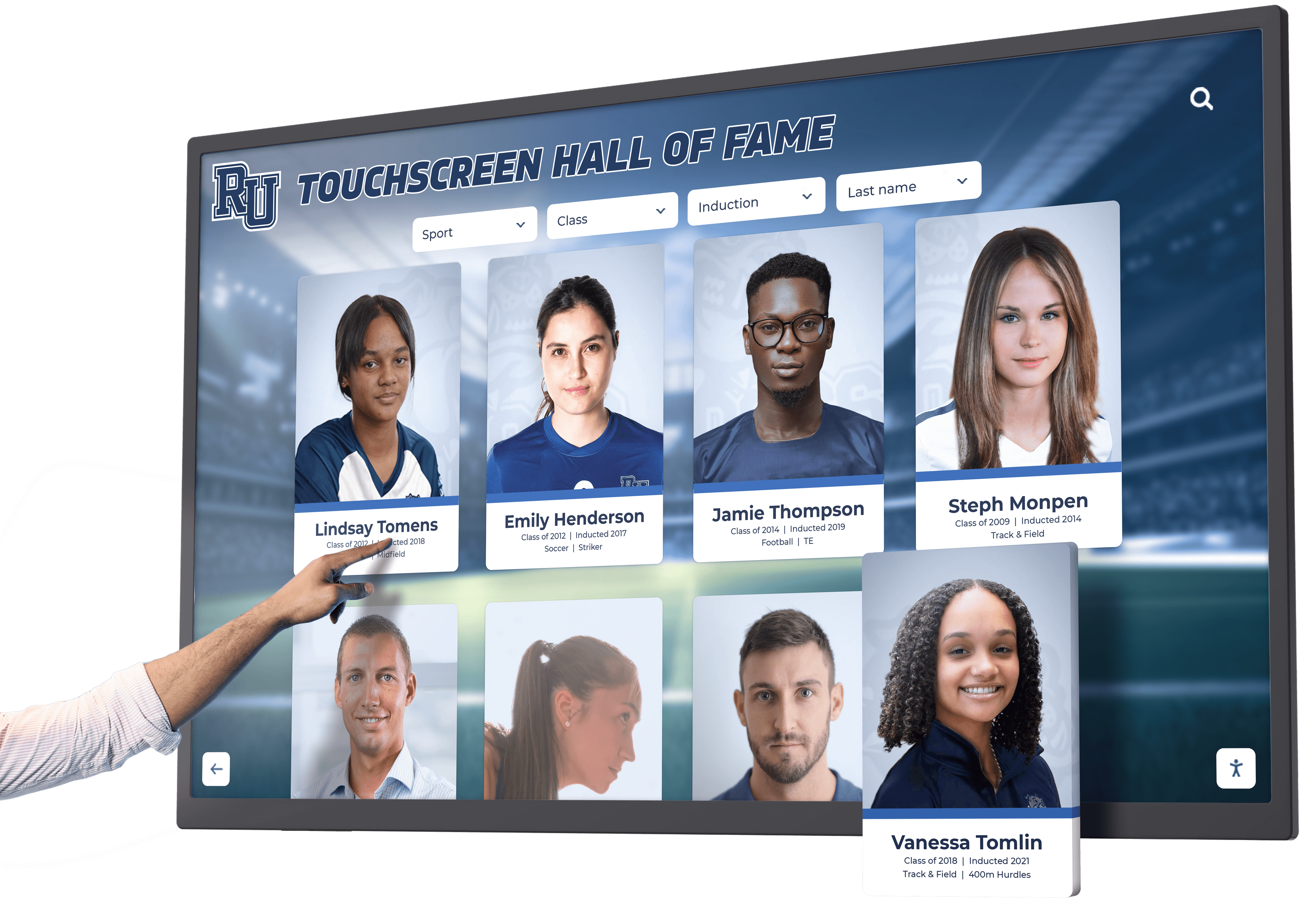




Modern sports venues have transformed from simple places to watch games into comprehensive entertainment destinations where fans expect immersive, technology-enhanced experiences from the moment they arrive. New fan experience centers at NFL and college football stadiums represent the evolution of this transformation, creating dedicated spaces where interactive digital displays inform, engage, and excite visitors through comprehensive information about events, stadium amenities, schedules, and future developments.
As professional and collegiate athletic programs compete for fan attention in an increasingly digital entertainment landscape, these experience centers serve critical functions beyond traditional static signage. They provide real-time wayfinding assistance, showcase upcoming events and promotions, celebrate franchise history and achievements, and communicate vision for facility improvements—all through engaging multimedia presentations that transform how fans discover and navigate modern sports complexes.
This comprehensive guide explores how organizations can implement digital recognition solutions in fan experience centers, examining the technology, content strategies, and implementation approaches that create compelling visitor experiences while serving operational objectives across NFL stadiums, college football venues, and sports facilities of all levels.
Fan experience centers represent intentional design decisions positioning technology as central to how venues communicate with visitors. Rather than relying on printed directories that quickly become outdated, paper schedules that fans discard, or static wall graphics that provide limited information, modern experience centers leverage interactive touchscreen displays, dynamic digital signage, and multimedia content management systems that adapt instantly to changing conditions while providing depth impossible through traditional approaches.

Interactive displays in stadium concourses enable fans to explore team history, find amenities, and discover upcoming events
Understanding the Modern Fan Experience Center
Before exploring implementation strategies, understanding what defines effective fan experience centers and why they’ve become essential components of modern sports venues provides important context.
Defining Fan Experience Centers
Fan experience centers are dedicated physical spaces or distributed installations throughout sports facilities that use technology to enhance visitor engagement, provide information, and create memorable interactions beyond watching games themselves.
Physical Configurations
Fan experience centers take various forms depending on venue architecture, budget, and objectives:
Dedicated Experience Zones - Some venues create substantial dedicated spaces featuring multiple large-format displays, interactive kiosks, artifact displays, seating areas, and photo opportunities. These destination zones become attractions in their own right, encouraging early arrival and providing entertainment during weather delays or between events.
The College Football Hall of Fame in Atlanta exemplifies this approach with 95,000 square feet of immersive exhibits, interactive displays, and engagement opportunities that celebrate college football history while creating compelling visitor experiences independent of specific games or teams.
Distributed Concourse Installations - Other venues integrate experience center elements throughout stadium concourses rather than consolidating in single locations. This distributed approach places interactive displays at strategic intervals, ensuring all fans encounter engagement opportunities regardless of seat location while reducing crowding that concentrated installations might create.
Lobby and Entry Experiences - Many facilities position primary experience center installations in main entry lobbies where all visitors pass, making powerful first impressions while providing essential wayfinding information immediately upon arrival. These entry experiences set cultural tone and demonstrate organizational priorities through what receives prominent technological showcasing.
Suite and Premium Areas - High-end venues extend experience center concepts into club spaces and premium areas, providing exclusive content, enhanced interactivity, or specialized displays that add value justifying premium pricing while creating distinct experiences for different fan segments.
Core Functions of Stadium Experience Centers
Effective fan experience centers serve multiple operational and engagement objectives simultaneously through integrated technological platforms.
Wayfinding and Navigation
Complex modern stadiums can overwhelm visitors unfamiliar with layouts. Experience centers provide:
Interactive Facility Maps - Touchscreen displays showing complete stadium layouts with search functionality for specific sections, gates, restrooms, concessions, team stores, and amenities. Unlike static directory boards, digital maps can highlight optimal routes, indicate real-time availability at concessions, and update instantly when facilities open or close.
Gate and Entry Information - Digital displays showing which entry gates serve different seating sections, security procedures, prohibited items, and estimated wait times at various entrances help fans plan arrival strategies minimizing frustration.
Accessibility Information - Interactive systems can provide detailed accessibility features including elevator locations, accessible seating sections, companion restroom facilities, sensory-friendly spaces, and services for fans with disabilities—information that improves experiences for families with special needs.
Solutions like Rocket Alumni Solutions provide platforms specifically designed for wayfinding applications in complex facilities, combining intuitive interfaces with robust content management enabling instant updates as conditions change.
Event Information and Schedules
Experience centers communicate comprehensive event details beyond basic game schedules:
Current Event Details - Information about today’s game including kickoff times, opponent information, special promotions, halftime entertainment, expected weather conditions, and parking/traffic advisories. This consolidated event information ensures all visitors access consistent, current details.
Upcoming Schedule - Complete season schedules with ticket availability, special event information for concerts or non-sporting events, promotional dates, theme games, and advance notice of schedule changes. Digital schedule displays eliminate printing costs for schedule cards while ensuring accuracy as schedules inevitably change.
Historical Context - Background on today’s opponent including historical records, memorable previous matchups, notable players or coaches, and rivalry context that enhances appreciation for games’ significance. This educational content serves casual fans who may not know detailed team histories.
Post-Game Information - After events conclude, displays can provide parking exit strategies, public transportation timing, traffic conditions, upcoming event reminders, and calls-to-action for season ticket purchases or merchandise—maintaining engagement during exit periods when fans remain on property.
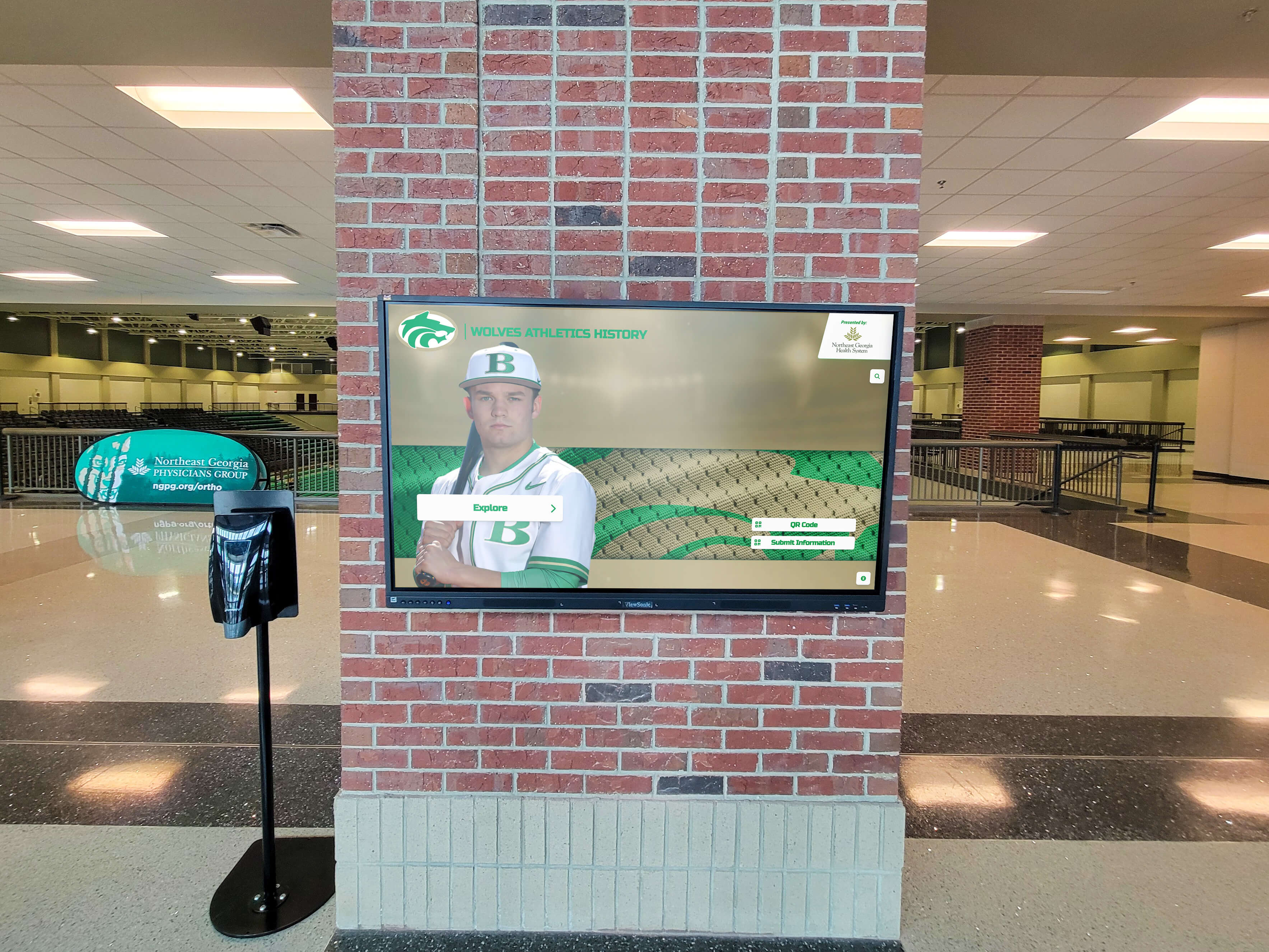
Professional venues integrate digital displays seamlessly with architectural design for comprehensive fan information
Concourse Details and Amenities
Modern stadiums offer extensive amenities that fans may not discover without guidance:
Concession and Dining Options - Interactive displays showing all food and beverage locations with menu highlights, specialty items, dietary accommodation information, pricing, and in some advanced implementations, real-time wait times or mobile ordering integration. This information helps fans make informed dining decisions without wandering entire concourses.
Retail and Merchandise - Team store locations, featured merchandise, game-day exclusive items, and promotional pricing. Advanced systems might integrate inventory information showing product availability at different locations, preventing frustration when fans seek specific items.
Entertainment and Activities - Information about interactive fan zones, kids’ play areas, photo opportunities, pregame entertainment, autograph sessions, and special programming. These activity listings ensure families with children or groups seeking comprehensive experiences discover all available options.
Services and Facilities - ATM locations, first aid stations, lost and found, guest services desks, charging stations, WiFi network information, and customer service contacts. Consolidated service information reduces staff time answering repetitive directional questions.
According to research on stadium technology, fans using mobile or digital wayfinding spend 23% less time searching for amenities and report 31% higher satisfaction with overall venue experiences compared to those relying solely on static signage.
Recognition and Heritage Celebration
Experience centers provide perfect platforms for showcasing organizational history and celebrating achievement:
Hall of Fame Integration - Interactive displays featuring comprehensive athlete recognition, championship team documentation, individual record holders, retired numbers, and franchise milestone celebrations. Digital platforms enable unlimited recognition capacity without physical space constraints limiting traditional trophy cases.
Historical Timelines - Visual chronologies showing franchise evolution, significant seasons, memorable moments, facility history, and cultural impact. Timeline presentations help newer fans understand traditions while creating nostalgia for long-time supporters.
Multimedia Storytelling - Video highlights of legendary performances, championship celebrations, defining moments, and player interviews bring history to life beyond what text descriptions achieve. Younger fans accustomed to video content particularly engage with multimedia historical presentations.
Current Season Recognition - Real-time acknowledgment of current season achievements including statistical leaders, player milestones, game-by-game results, and championship progression. This current recognition maintains relevance while connecting present performance to historical excellence.
Explore comprehensive approaches for professional athlete recognition displays that honor franchise legends appropriately.
Future Vision Communication
Experience centers effectively communicate organizational direction and facility development:
Facility Improvement Presentations - Architectural renderings, video fly-throughs, and detailed descriptions of planned renovations, expansions, or new construction. Communicating facility investment demonstrates organizational commitment while building anticipation for improvements.
Program Development Plans - Information about new initiatives, enhanced services, technology upgrades, sustainability efforts, or community programs. Transparent communication about organizational priorities builds trust and engagement.
Capital Campaign Recognition - For college programs or teams conducting major fundraising initiatives, experience centers can acknowledge donors, illustrate campaign progress, show how contributions translate to specific improvements, and inspire additional support. Digital displays update instantly as campaigns achieve milestones, maintaining current recognition without waiting for physical installations.
Vision and Mission - Organizational values, community commitments, diversity and inclusion initiatives, and institutional priorities. Experience centers provide platforms for values communication that goes beyond marketing materials to create substantive engagement with organizational character.
Technology Infrastructure for Fan Experience Centers
Implementing effective experience centers requires understanding the technology components that enable comprehensive, reliable, engaging systems.
Hardware Considerations for Stadium Environments
Professional sports venues present unique technical challenges requiring robust equipment specifications.
Commercial-Grade Touchscreen Displays
Consumer electronics lack durability for stadium environments where thousands of visitors interact daily. Commercial specifications include:
Operating Hours - Commercial displays rated for 16-18 hours daily operation, 7 days per week, withstand continuous use that quickly destroys consumer screens designed for 6-8 hours daily in controlled environments.
Brightness Ratings - Stadium concourses feature bright lighting and potential sunlight exposure requiring displays with 1000+ nit brightness (compared to 300-400 nits for consumer screens) ensuring visibility under all conditions.
Touch Durability - Commercial touch overlays using projected capacitive technology withstand millions of touch interactions without degradation, while consumer touchscreens may fail after months of heavy public use.
Protective Glass - Tempered glass protection prevents screen damage from impact in crowded environments where displays might receive accidental contact from bags, equipment, or intentional vandalism attempts.
Temperature Tolerance - Semi-outdoor concourse locations experience temperature variations requiring displays rated for extended temperature ranges beyond consumer specifications designed for climate-controlled homes.
Size Considerations - Most stadium installations use 55-inch to 75-inch displays providing adequate size for visibility and engagement without overwhelming concourse spaces or requiring excessive installation clearances. Larger installations might incorporate 85-inch or larger displays for maximum visual impact in primary locations.

Freestanding kiosks provide flexible installation options without requiring wall mounting in existing structures
Mounting Solutions and Physical Installation
How displays are mounted affects functionality, aesthetics, and longevity.
Wall-Mounted Installations - Direct mounting to structural walls provides clean integration and maximizes floor space. Wall mounting requires:
- Structural analysis ensuring walls support display weight plus mounting hardware
- Secure mounting preventing theft or tampering in public spaces
- Cable management concealing power, network, and any peripheral connections
- Appropriate height positioning touchscreens at accessible levels (typically 36-48 inches from floor to center)
- Clearance ensuring visitors can approach displays without obstructing concourse traffic
Freestanding Kiosks - Self-contained units on floor stands offer flexibility for placement in open concourse areas, temporary installations during events, or locations where wall mounting proves impractical. Quality kiosks feature:
- Heavy bases preventing tipping or movement during use
- Secure enclosures protecting equipment while allowing maintenance access
- Integrated cable management hiding all connections
- Professional appearance matching venue aesthetics
- Optional branding customization incorporating team colors and logos
Integrated Architectural Solutions - Premium installations might incorporate displays into custom millwork, branded structures, or architectural features creating seamless integration with overall facility design. These custom installations require collaboration between technology vendors, architects, and contractors ensuring technical requirements are met within design visions.
Network Infrastructure Requirements
Interactive displays require reliable connectivity supporting content delivery, updates, and potential analytics.
Wired Network Connections - Dedicated Ethernet connections provide most reliable connectivity for displays requiring consistent bandwidth for video content, real-time updates, and content management. Network requirements include:
- Minimum 100 Mbps connections (1 Gbps preferred for video-heavy applications)
- Network segmentation separating public-facing displays from operational systems
- VLAN configuration and security protocols protecting infrastructure
- Redundancy considerations for mission-critical installations
- PoE (Power over Ethernet) capability in some applications reducing cabling requirements
Wireless Alternatives - While wired connections provide optimal reliability, high-quality wireless networks can support display installations where running cables proves impractical. Wireless implementations require:
- Enterprise-grade access points providing consistent coverage
- 5GHz bands with adequate channel width and throughput
- Signal strength testing at installation locations before deployment
- Interference management in RF-dense stadium environments
- Fallback procedures if wireless connectivity fails during events
Content Delivery Networks - Large venues with multiple distributed displays benefit from local content servers reducing bandwidth requirements for centralized delivery while ensuring content availability if internet connectivity fails. CDN approaches particularly benefit installations showing substantial video content.
Power Infrastructure
Reliable power provisions prevent display failures during critical event periods.
- Dedicated circuits preventing displays from sharing power with high-draw equipment
- UPS (Uninterruptible Power Supply) for critical wayfinding displays ensuring operation during brief power fluctuations
- Accessible power disconnects enabling safe maintenance
- Load calculations ensuring electrical infrastructure adequately supports all displays plus any future expansion
- Emergency shutdown capabilities if safety situations require immediate display deactivation
Software Platforms and Content Management Systems
Hardware provides display infrastructure, but software determines functionality, usability, and operational sustainability.
Purpose-Built Experience Center Platforms
Solutions like Rocket Alumni Solutions offer comprehensive platforms specifically designed for stadium and venue applications combining:
Intuitive Content Management - Web-based interfaces enabling non-technical staff to update content without IT involvement, template-driven layouts ensuring consistent professional presentation, media asset management for photos and videos, scheduling capabilities for time-based content rotation, and role-based permissions allowing different staff access to relevant content sections.
Interactive Features - Touch-enabled interfaces with familiar gesture support, sophisticated search functionality for wayfinding and information discovery, multimedia playback for video and audio content, real-time data integration showing current information, and analytics tracking understanding how visitors use displays.
Multi-Display Management - Centralized control managing content across numerous distributed displays, display grouping sending same content to specific locations, individual customization tailoring content to particular locations, remote monitoring verifying displays operate correctly, and instant updates pushing changes to all displays simultaneously.
Integration Capabilities - APIs connecting with ticketing systems for event information, schedule data feeds maintaining current calendars automatically, social media integration pulling current posts or allowing sharing, mobile app coordination creating consistent omnichannel experiences, and analytics platforms for comprehensive usage reporting.
Proven Reliability - Cloud-based hosting eliminating on-site server requirements, automatic software updates without local IT involvement, 99.9%+ uptime commitments ensuring availability during critical events, technical support from teams understanding venue applications, and security protocols protecting systems and data.
Purpose-built platforms provide fastest paths to comprehensive functionality with lowest technical risk and ongoing support specifically addressing venue operational realities.
Learn about selecting digital hall of fame touchscreen technology appropriate for professional installations.
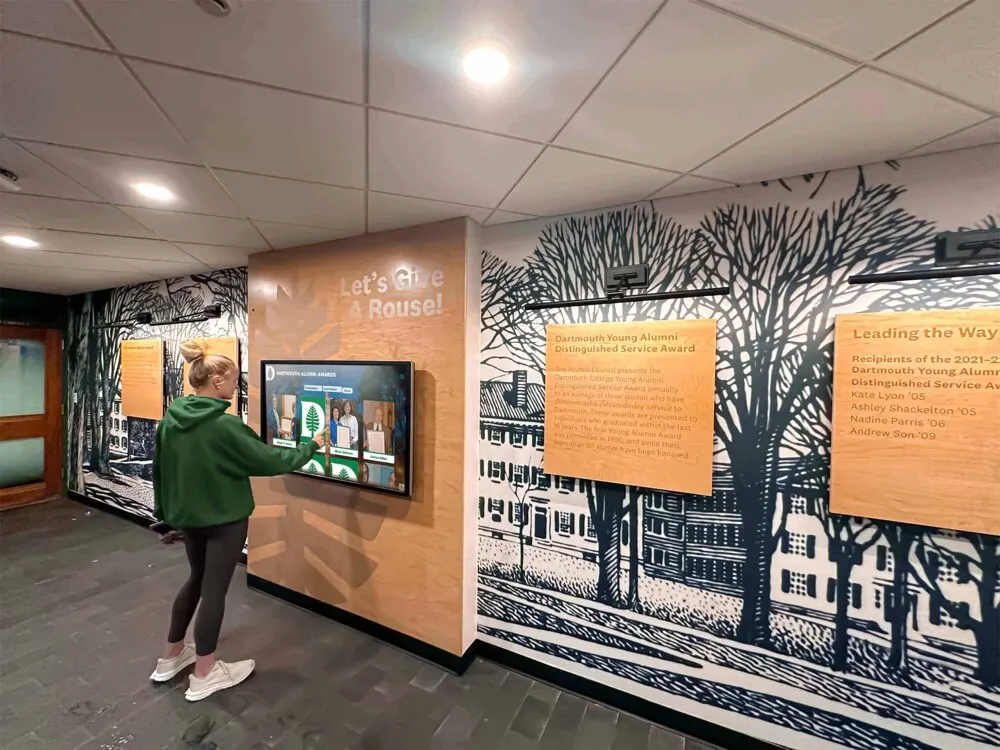
Intuitive touchscreen interfaces enable visitors to explore content easily without instructions or staff assistance
Digital Signage Solutions
Generic digital signage platforms provide alternatives for simpler applications, though typically with reduced interactivity:
Content Scheduling - Time-based content rotation, day-parting for different audiences, event-specific content activation, and emergency override capabilities for urgent messaging.
Layout Management - Template-based design tools, zone-based content organization, transition effects and animations, and consistent branding across displays.
Playlist Control - Sequential content presentation, duration settings for each content element, loop configuration, and priority-based interruption for time-sensitive information.
Digital signage works well for non-interactive informational displays throughout concourses but lacks sophisticated search, filtering, and detailed content exploration capabilities that interactive experience center applications typically require.
Custom Development
Organizations with substantial budgets and in-house development capabilities might pursue fully custom applications:
Maximum Flexibility - Precisely tailored to specific organizational needs, unique features not available in commercial platforms, complete control over data structures and presentation, and proprietary intellectual property ownership.
Significant Requirements - Substantial upfront development investment, ongoing maintenance and enhancement budgets, dedicated technical staff for support, longer implementation timelines, and technical risk if projects exceed capabilities or timelines.
Custom development makes sense for very large organizations with unique requirements and dedicated resources but typically proves unnecessarily expensive and risky for most venue applications where commercial platforms adequately serve needs.
Analytics and Usage Tracking
Understanding how fans interact with experience center displays informs content optimization and demonstrates value justifying investment.
Engagement Metrics
Modern platforms provide detailed analytics previously impossible with static signage:
Usage Volume - Total interaction counts by day, time, and location revealing which displays receive most engagement, identifying high-traffic versus underutilized installations, and showing usage patterns throughout event days.
Session Duration - Average time visitors spend interacting with displays indicating content effectiveness. Very brief sessions suggest confusing interfaces or uncompelling content, while extended engagement demonstrates valuable experiences.
Content Performance - Which features visitors access most frequently, what search terms reveal visitor priorities, which pages or sections receive extended viewing, and where visitors exit demonstrating content flow effectiveness.
Demographic Insights - When privacy-compliant tracking allows, understanding visitor demographics helps tailor content to actual audience characteristics rather than assumptions about typical fans.
Conversion Tracking - For displays incorporating calls-to-action like ticket purchase links, mobile app downloads, or social media follows, tracking conversion rates demonstrates direct business impact beyond engagement metrics alone.
Operational Benefits
Analytics inform operational improvements beyond content optimization:
Staffing Decisions - Usage patterns showing when displays receive peak engagement help position staff for assistance during high-demand periods while reducing unnecessary staffing during slow times.
Hardware Planning - Utilization data identifying heavily-used displays justifies additional installations in similar locations, while underperforming displays might be relocated to higher-traffic areas or receive content revisions improving engagement.
Content Development Priority - Understanding which content types and topics attract most interest focuses limited content development resources on highest-value opportunities rather than equal investment across all possibilities.
ROI Demonstration - Comprehensive usage metrics provide quantitative evidence supporting continued investment during budget discussions, particularly when combined with fan satisfaction surveys and operational efficiency improvements.
According to research from venue technology providers, organizations that actively review and respond to experience center analytics report 45% higher visitor satisfaction and 38% better content engagement compared to those deploying systems without systematic data review.
Content Strategy for Stadium Experience Centers
Technology infrastructure enables experience centers, but compelling, well-organized content determines whether fans engage meaningfully with systems or walk past without stopping.
Information Architecture and Content Organization
How content is structured fundamentally affects usability regardless of interface quality.
User-Centered Organization
Content should be organized around visitor needs and mental models rather than organizational convenience:
Task-Oriented Categories - Group content by visitor objectives like “Find Your Seat,” “Discover Food & Drink,” “Learn About Today’s Game,” “Explore Team History,” and “Plan Your Visit” rather than organizational departments that created content.
Progressive Disclosure - Present essential information immediately on main screens with additional detail available for those who want deeper exploration. Avoid overwhelming visitors with comprehensive information on initial screens that should provide clear starting points for navigation.
Intuitive Navigation - Use familiar patterns from consumer devices rather than creating novel navigation paradigms that require learning. Standard conventions like hamburger menus, search icons, back buttons, and swipe gestures feel natural to smartphone-acculturated audiences.
Clear Visual Hierarchy - Typography, color, spacing, and layout should guide visitors toward most important information through visual weight rather than requiring them to read everything equally to identify priorities.
Consistent Patterns - Once establishing navigation patterns and visual conventions, maintain consistency across all screens and content types so visitors who learn systems in one area can confidently navigate throughout.
Search and Discovery Features
Comprehensive content becomes overwhelming without powerful discovery mechanisms:
Robust Search - Text search for locations, amenities, players, or events with intelligent matching tolerating misspellings and partial entries. Voice search increasingly expected by visitors accustomed to Siri and Alexa.
Category Filtering - Browse options letting visitors filter by content type, location, time, audience (families, accessibility, premium areas), or other relevant dimensions enabling exploration without specific searches.
Featured Content - Curated highlights surfacing most timely or important information ensuring casual browsers encounter priority content without systematic searching.
Related Content - Intelligent connections suggesting related information based on current viewing. If someone views restroom locations, surfacing nearby concessions and first aid facilities provides contextually relevant discovery.
Map Integration - Spatial browsers using interactive facility maps as visual interfaces where visitors tap locations to discover nearby amenities, search results display as map pins showing locations, and route guidance shows optimal paths from current location to destinations.

Card-based interfaces enable intuitive browsing and selection of detailed profile information
Dynamic Content and Real-Time Information
Static content quickly loses relevance in dynamic event environments where conditions change constantly.
Event-Day Context
Content should adapt to current circumstances:
Current Event Customization - Today’s game information, opponent details, weather conditions, special promotions, and themed content replacing generic defaults. Visitors expect relevant, timely information specific to their current experience.
Time-Based Content - Different information priorities at different times: pre-event content focuses on parking, gate information, and facility navigation; in-game content highlights scores, statistics, and entertainment; post-event content provides exit strategies, traffic conditions, and upcoming event reminders.
Real-Time Condition Updates - Live information about concession wait times, restroom availability, parking lot capacity, security screening delays, or service disruptions. Real-time operational data transforms experience centers from passive information sources to active assistance tools.
Weather Integration - Current conditions, forecasts, lightning delay protocols, and extreme weather procedures. Particularly relevant for outdoor stadiums where weather significantly impacts visitor experiences.
Emergency Communication - Systems must support urgent messaging overriding regular content during emergencies, providing evacuation guidance, medical emergency information, or security instructions. Regular testing ensures emergency capabilities function when needed.
Seasonal and Schedule Adaptation
Content relevance extends beyond individual event days:
Season Context - Regular season versus playoff content, championship scenarios, milestone achievement opportunities, or postseason positioning creating context for individual games’ significance.
Opponent-Specific Content - Historical records against today’s opponent, rivalry context, memorable previous matchups, and notable opponent players or coaches. This background educates casual fans while creating anticipation for regular attendees.
Holiday and Theme Integration - Special content for homecoming, military appreciation days, breast cancer awareness, youth nights, alumni weekends, or other themed events. Coordinated content reinforces themes while providing relevant information about special activities.
Off-Season Utilization - Many venues host events beyond primary sports including concerts, festivals, tours, or other sports. Experience center content should adapt supporting all facility uses rather than showing stale sports content when buildings host different events.
Anniversary and Historical Milestones - Recognizing facility anniversaries, championship anniversaries, player milestones, or historical achievements creates educational content connecting current visitors to heritage while providing evergreen material during content planning.
Multimedia Content Integration
Text-only displays feel dated to contemporary audiences expecting rich multimedia experiences.
Photography and Visual Content
High-quality visual content creates immediate emotional impact and enables rapid information communication:
Action Photography - Dynamic images of players, fans, game action, and celebrations creating excitement and energy. Professional sports photography captures peak moments that evoke emotional responses text cannot achieve.
Facility Photography - High-quality images of amenities, concourse areas, club spaces, and venue features helping visitors visualize destinations before arrival. Visual previews reduce uncertainty particularly for first-time visitors unfamiliar with layouts.
Historical Archives - Vintage photographs documenting franchise history, facility evolution, memorable moments, and legendary players. Historical images create nostalgia for long-time fans while educating newer supporters about traditions.
Infographics and Data Visualization - Visual representations of statistics, records, schedules, or comparative information communicating complex data more effectively than tables or text. Well-designed infographics enable rapid comprehension of quantitative information.
Consistent Visual Standards - Photography should maintain quality standards regarding resolution, composition, color accuracy, and appropriate content. Inconsistent visual quality undermines professional presentation regardless of system technical capabilities.
Explore approaches for creating engaging video content for digital displays that capture attention and communicate effectively.
Video Content
Motion graphics and video create compelling content impossible through static media:
Highlight Packages - Game highlights, championship moments, record-breaking performances, and memorable plays bringing athletic achievement to life. Video highlights particularly engage younger audiences accustomed to consuming sports content through video platforms.
Player and Coach Interviews - First-person perspectives from athletes, coaches, and organizational leaders creating authentic connections impossible through third-party descriptions. Interview content humanizes individuals while providing insights into experiences and perspectives.
Behind-the-Scenes Content - Training facility tours, game preparation footage, travel experiences, or day-in-the-life documentaries providing insider perspectives fans rarely access. Exclusive content creates value beyond publicly available media.
Facility Tours and Previews - Video walkthroughs of premium areas, renovated facilities, or upcoming improvements showing features photographs cannot adequately convey. Architectural fly-throughs communicate spatial relationships and design intent for projects under development.
Instructional Content - How-to videos explaining mobile ticketing, parking procedures, security screening, mobile ordering, or accessibility services. Brief instructional videos communicate procedures more effectively than text descriptions while feeling more welcoming than formal written instructions.
Technical Specifications - Video content requires appropriate compression balancing quality with file sizes, reliable playback without buffering or stuttering, captions for accessibility and sound-off environments, and appropriate aspect ratios matching display orientations.
Audio Content
While many stadium environments feature ambient noise making audio challenging, strategic sound integration enhances experiences:
Narration and Voiceover - Professional narration for video content, audio descriptions for accessibility, or ambient audio creating atmosphere in dedicated experience center spaces with controlled acoustics.
Historical Audio Archives - Radio broadcast clips, memorable calls, press conference excerpts, or oral history recordings preserving voices and perspectives from franchise history. Audio archives complement visual content while providing multisensory historical documentation.
Music and Sound Effects - Background music creating energy and atmosphere, sound effects enhancing interactivity, or signature sounds associated with brand identity. Strategic audio design contributes to overall experience quality when environmental conditions allow.
Volume Considerations - Audio must be carefully managed in stadium environments. Localized directional speakers contain sound to immediate display areas, automatic volume adjustment responds to ambient noise levels, and mute capabilities prevent audio conflicts during games when PA systems take precedence.
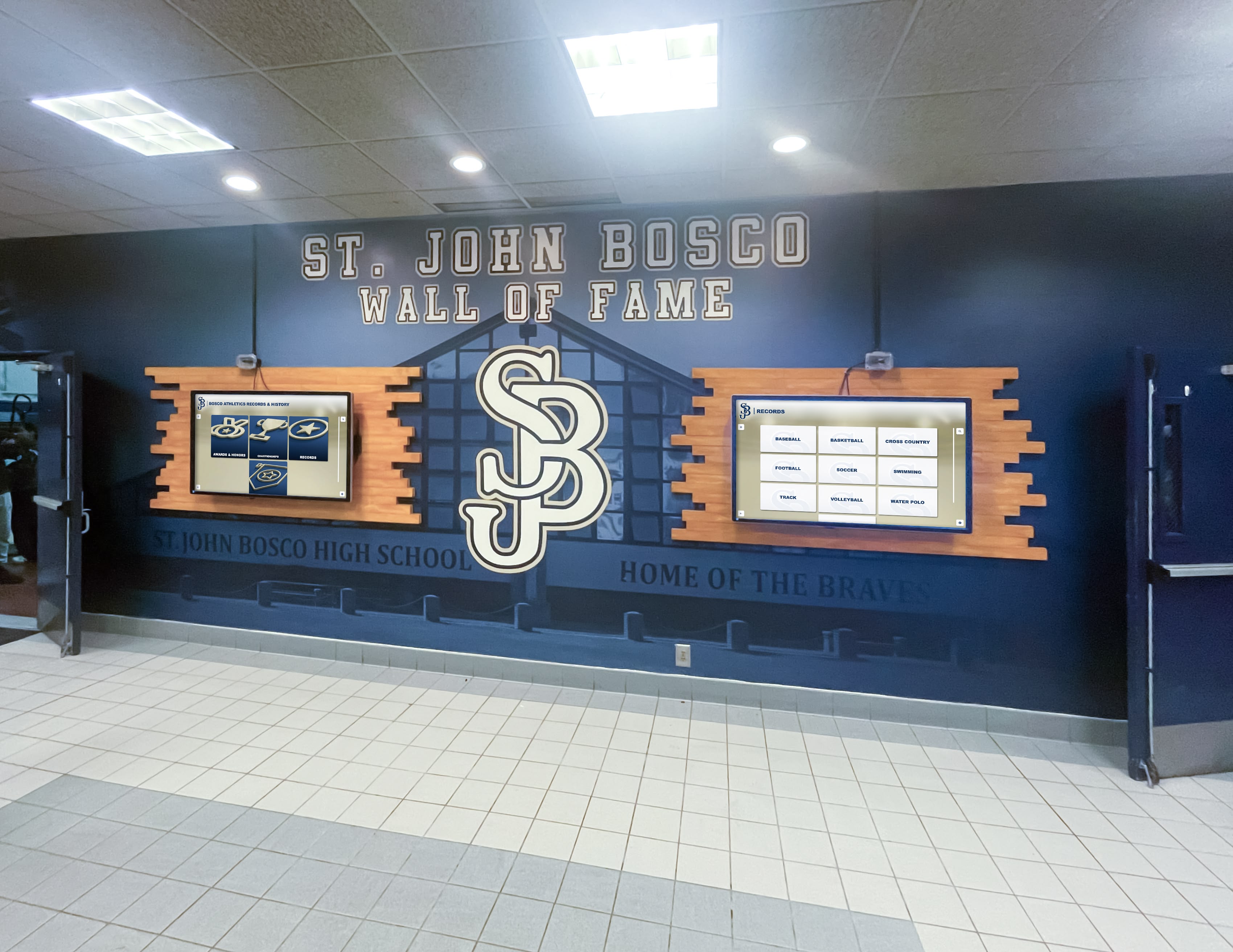
Multiple coordinated displays create comprehensive information and recognition installations
Implementation Strategies for Professional and Collegiate Venues
Successfully deploying fan experience centers requires systematic approaches addressing planning, installation, content development, and sustained operations.
Needs Assessment and Requirements Definition
Effective implementations begin with clear understanding of objectives, audiences, and constraints.
Stakeholder Engagement
Identify and involve groups with interests in experience center success:
Fan Experience Teams - Marketing, fan engagement, and guest services staff who understand visitor needs, common questions, pain points, and opportunities for improvement. These teams should drive content requirements and prioritization.
Operations Staff - Personnel managing facilities, events, security, and logistics who understand operational realities, crowd flow, staffing challenges, and information needs during events. Operations input ensures implementations support rather than complicate facility management.
Technology Teams - IT staff responsible for network infrastructure, security, systems integration, technical support, and sustainability. Early technology involvement prevents implementations requiring unavailable infrastructure or creating unsustainable support burdens.
Content Creators - Marketing, communications, creative services, and historical archive staff who will produce content for experience centers. Understanding content creation capabilities and limitations ensures realistic expectations for volume, quality, and update frequency.
Executive Leadership - Securing executive support and budget authority early prevents late-stage complications when projects encounter unexpected costs or require organizational prioritization decisions.
Fan Representatives - Including season ticket holders, booster representatives, or fan advisory groups ensures implementations serve actual visitor needs rather than organizational assumptions about what fans want.
Objective Definition
Clarify specific goals experience centers should achieve:
Primary Purposes - Is the center primarily for wayfinding and operational information, historical recognition and engagement, revenue generation through promotional content, brand building and storytelling, or integrated combination serving multiple objectives? Clear purpose definition guides feature prioritization and success metric identification.
Target Audiences - Who represents priority audience segments: first-time visitors needing comprehensive wayfinding, regular season ticket holders seeking deeper engagement, families with children requiring activity information, premium guests expecting enhanced experiences, or media and VIP visitors needing specialized services?
Success Criteria - How will success be measured: visitor usage metrics, operational efficiency improvements, fan satisfaction scores, reduced staff time answering directional questions, increased awareness of amenities and programs, social media engagement, or attendance impacts?
Budget Parameters - What financial resources are available: capital budgets for initial installation, operating budgets for ongoing content and support, phased implementations spreading costs across time, or fundraising requirements before proceeding?
Clear objectives, audience definition, and success criteria provide frameworks for all subsequent decisions ensuring implementations serve strategic purposes rather than deploying technology without clear organizational value.
Technical Requirements
Document specific capabilities installations must provide:
Content Requirements - What information must be accessible: facility maps and wayfinding, event schedules and ticketing, food and beverage menus, retail and merchandise information, recognition and history, future development communications, sponsor content, or safety and emergency information?
Functional Capabilities - What interactivity is needed: search functionality, filtering and browsing, multimedia playback, real-time data integration, mobile app coordination, social media integration, multilingual support, or accessibility accommodations?
Integration Needs - What systems must connect: ticketing platforms, scheduling systems, point-of-sale, mobile applications, social media, analytics platforms, or building management systems?
Location and Coverage - Where should displays be positioned: main entrances, ticketing areas, concourse intersections, elevator lobbies, club spaces, specific seating section entrances, parking structures, or exterior plazas?
Scale Considerations - How many displays are needed for adequate coverage, what sizes are appropriate for different locations, and will consistent configurations be used throughout or customized by location?
Comprehensive requirements documentation prevents scope creep and feature bloat while ensuring all stakeholders share common understanding about what will be delivered.
Vendor Selection and Technology Partnership
Most organizations benefit from partnering with specialized vendors rather than attempting fully in-house implementations.
Evaluation Criteria
Assess potential vendors systematically across relevant dimensions:
Relevant Experience - Prior installations in professional sports, collegiate athletics, or similar venue applications demonstrating understanding of operational requirements, scalability needs, and reliability expectations specific to stadium environments.
Technical Capabilities - Platform features matching requirements, multimedia support, integration capabilities, analytics functionality, mobile coordination, and cloud versus on-premise architecture aligning with IT preferences.
Content Management - Interface intuitiveness for non-technical users, template systems enabling consistent presentation, media asset management, workflow capabilities, scheduled publishing, and role-based permissions matching organizational structures.
Support and Services - Implementation assistance during deployment, training for staff, ongoing technical support, content services if needed, system monitoring, and documented service level agreements establishing response time commitments.
Financial Model - Capital purchase versus subscription pricing, per-display versus platform licensing, included services versus additional fees, scalability of pricing as installations expand, and long-term total cost of ownership.
Reference Customers - Documented installations at comparable venues with contactable references willing to discuss experiences, challenges, and satisfaction with vendor performance.
Roadmap and Innovation - Product development trajectory showing investment in platform evolution, emerging capabilities in development, and commitment to maintaining competitive functionality as technology landscapes evolve.
Solutions like Rocket Alumni Solutions provide purpose-built platforms specifically designed for recognition and information display applications with proven implementations across educational athletics and professional venues.
Proof of Concept and Pilot Programs
Before committing to venue-wide deployments, consider smaller-scale validation:
Pilot Installations - Deploying single displays or small installations in limited areas providing opportunities to test platforms, refine content, validate assumptions, and demonstrate value before major investments. Successful pilots build organizational confidence and stakeholder buy-in supporting expansion.
Vendor Demonstrations - In-depth platform demonstrations with representatives interacting with systems, content being loaded into trial environments, and capabilities being validated against requirements ensure platforms actually deliver advertised functionality.
Trial Periods - Some vendors offer trial access or proof-of-concept engagements enabling evaluation with actual content and use cases before purchase commitments. Trials reduce risk by validating technical fit before major expenditure.
Pilots and trials obviously delay full-scale deployment but substantially reduce risk of major implementations not meeting expectations or requiring expensive changes after installation.
Learn about implementing touchscreen displays in athletic facilities through phased deployment approaches.

Strategic lobby placement ensures maximum visibility and engagement for all facility visitors
Content Development and Management Workflows
Technology platforms provide infrastructure, but systematic content development ensures displays provide value from day one and maintain relevance long-term.
Initial Content Creation
Launch-ready experience centers require substantial upfront content development:
Core Wayfinding Content - Comprehensive facility maps, all amenity locations, seating section information, accessibility details, and service locations. Wayfinding represents essential foundation ensuring basic utility regardless of additional content.
Event Calendar and Schedules - Complete season schedules, opponent information, special events, promotional dates, and ticket availability. Schedule accuracy is critical—nothing undermines credibility faster than outdated schedule information.
Recognition and Historical Content - For installations emphasizing heritage celebration, developing initial hall of fame profiles, championship team documentation, historical timelines, and multimedia archives requires substantial research, writing, and production. Organizations should be realistic about content volume achievable before launch versus what will be added over time.
Media Asset Production - Professional photography of facilities and amenities, historical photo scanning and digitization, video production for highlight packages or informational content, graphics creation for branded templates, and audio production if planned.
Informational Content - Descriptions of amenities, dining options, retail locations, accessibility services, policies and procedures, and practical visitor information. Well-written, comprehensive informational content reduces operational burden answering repetitive questions.
Content Review Processes - Establish approval workflows ensuring accuracy, appropriate presentation, legal compliance, sponsor acknowledgment requirements, and organizational consistency before content goes live.
Ongoing Content Management
Experience centers require continuous content maintenance for sustained relevance:
Regular Updates - Event information changes, schedule modifications, new achievements requiring recognition, staff changes, facility updates, and policy revisions all require prompt content updates maintaining accuracy.
Seasonal Content Rotation - Creating themed content for different seasons, holidays, playoff periods, or special events keeps experience centers feeling fresh while highlighting timely information.
Performance-Based Optimization - Using analytics data to refine content based on what visitors access most, what searches reveal priorities, where visitors encounter confusion or drop off, and what content durations optimize engagement without overwhelming.
Content Expansion - Systematically adding historical profiles, building multimedia libraries, developing new features, and expanding coverage over time recognizing that complete comprehensive content isn’t realistic at launch but accumulates through sustained effort.
Responsibility Assignment - Clear ownership for content management prevents systems from becoming outdated when nobody specifically owns updates. Whether individual staff members, cross-functional committees, or vendor-provided services, explicit responsibility ensures work happens consistently.
Content Management Tools and Templates - Modern platforms provide content management systems reducing technical barriers:
- Template-based profile creation ensuring consistent presentation
- Media libraries organizing photos, videos, and graphics
- Scheduling capabilities publishing content at appropriate times
- Workflow tools routing content for review and approval
- Version history tracking changes and enabling rollback if needed
- Role-based permissions allowing appropriate access for different staff
These tools transform content management from technical challenge requiring specialized skills to administrative workflow accessible to marketing and communications professionals already creating content for other organizational channels.
Explore comprehensive content planning for digital recognition displays ensuring sustainable long-term operations.
Applying Rocket Alumni Solutions in Fan Experience Centers
Understanding how comprehensive digital recognition platforms specifically serve stadium experience center applications provides concrete implementation examples.
Recognition and Historical Content
Fan experience centers benefit tremendously from robust recognition capabilities celebrating franchise heritage and achievement.
Unlimited Recognition Capacity
Traditional trophy cases and physical plaques face inevitable space constraints forcing organizations to choose whose achievements receive visibility. Digital platforms like Rocket Alumni Solutions eliminate these limitations:
Comprehensive Player Recognition - Honor every hall of fame inductee, retired number, statistical leader, award winner, championship contributor, or memorable player across franchise history without physical space constraints limiting recognition to most recent honorees or most prominent names.
Complete Team Documentation - Celebrate every championship season, playoff appearance, rivalry victory, or significant team achievement with detailed roster information, season statistics, memorable games, defining moments, and cultural impact impossible to document through limited trophy case space.
Historical Archives - Preserve complete franchise timelines, facility evolution, significant moments, legendary coaches and executives, iconic fans and traditions, and comprehensive institutional memory that grows more valuable over time.
Rocket Alumni Solutions platforms specifically support unlimited profile capacity enabling comprehensive recognition impossible through traditional approaches, with cloud-based infrastructure ensuring performance regardless of content volume.
Rich Multimedia Storytelling
Effective recognition extends beyond names and dates to comprehensive achievement documentation:
Player Profiles - Detailed biographical information, complete statistics and achievements, career highlights and memorable performances, personal narratives and interviews, post-career accomplishments, and multimedia content including photos, video highlights, and historical context.
Championship Season Documentation - Complete rosters with individual contributions, season narratives and progression, memorable games and defining moments, championship clinching documentation, celebration footage and parade coverage, and statistical records placing achievements in historical context.
Interactive Exploration - Search functionality enabling fans to find specific players or teams, filtering by era, achievement type, position, or award, timeline views showing chronological progression, related content connections between players, teams, and moments, and social sharing enabling fans to share favorite profiles with friends and family.
This depth transforms recognition from simple acknowledgment into educational content that engages casual fans while satisfying enthusiasts seeking comprehensive information.
Discover approaches for professional sports digital halls of fame that celebrate achievement comprehensively.
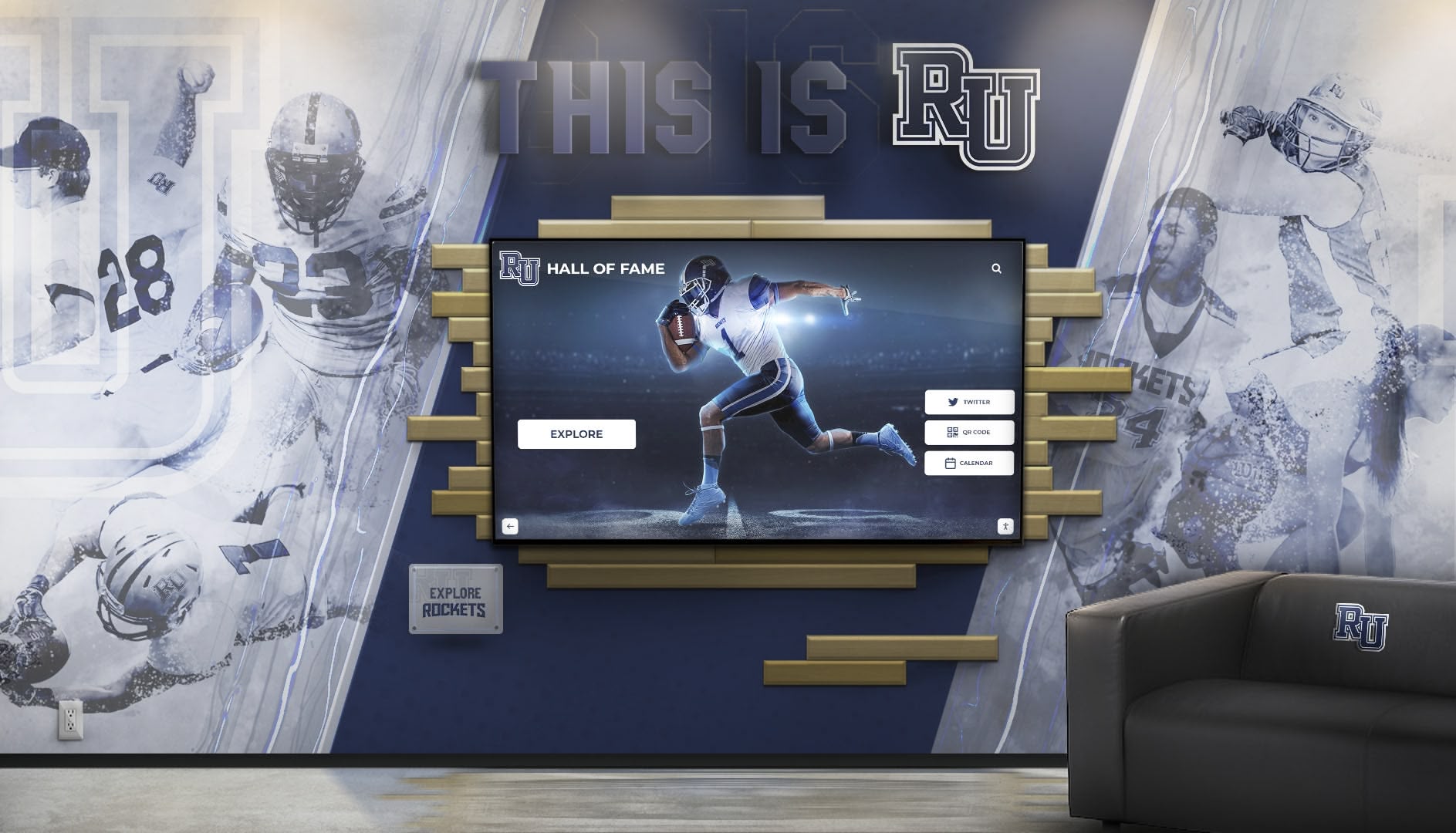
Integrated installations blend traditional design with interactive technology for comprehensive recognition experiences
Wayfinding and Operational Information
Beyond recognition, comprehensive platforms support practical facility navigation and operational communication.
Interactive Facility Maps
Modern experience centers require sophisticated mapping capabilities:
Complete Venue Coverage - Detailed maps showing all seating sections, gate entrances, concession locations, restroom facilities, retail stores, first aid stations, elevators and escalators, club spaces, parking areas, and service locations providing comprehensive orientation for visitors.
Search and Navigation - Text search for specific locations or amenities, turn-by-turn routing from current location to destinations, real-time information about wait times or availability, accessibility route planning accommodating mobility limitations, and save favorite locations for repeat visitors.
Dynamic Content Integration - Maps connecting to detailed information about locations, concession menus accessible from map locations, retail store featured merchandise, event-specific activations or temporary facilities, and sponsor locations or branded spaces.
Mobile Coordination - Maps accessible through venue mobile apps, QR codes at physical displays enabling map transfer to personal devices, location sharing helping groups coordinate meetups, and save preferences syncing across physical displays and mobile applications.
Current Event Information
Experience centers should provide comprehensive game-day details:
Today’s Event - Opponent information and history, kickoff or start time, expected weather conditions, special promotions or themed activities, parking and transportation advisories, and anticipated crowd size or attendance considerations.
Entertainment and Activities - Pregame entertainment schedule and locations, halftime performances, in-game contests and promotions, kids’ activity zones and timing, post-game activities or concerts, and special appearances or autograph sessions.
Operational Updates - Gate opening times and entry procedures, security screening information, parking lot status and availability, concession or retail location closures, accessible services and accommodations, and guest services contact information.
Safety and Emergency - Emergency procedures and evacuation routes, severe weather protocols, first aid and medical services, lost child procedures, security contact information, and crisis communication override capabilities.
Future Vision Communication
Experience centers effectively communicate organizational direction and development:
Facility Improvement Presentations
Major renovation or construction projects benefit from comprehensive visual communication:
Architectural Renderings - High-quality images showing planned improvements, before-and-after comparisons demonstrating transformations, detailed views of specific areas or features, and context images showing projects within overall facility.
Video Fly-Throughs - Animated walkthroughs exploring planned spaces, architectural animations showing design intent, construction progress time-lapses documenting development, and completed project showcases celebrating improvements.
Project Information - Timelines and milestone dates, scope of work descriptions, expected benefits and improvements, sustainability and efficiency features, accessibility enhancements, capacity changes, and technology upgrades.
Donor Recognition - For projects funded through donations or capital campaigns, recognizing contributors at appropriate levels, showing campaign progress toward goals, illustrating how contributions translate to specific improvements, and inspiring additional support through demonstrated impact.
Digital platforms enable instant updates as projects progress, maintaining current information without waiting for physical installation updates that quickly become outdated during active construction.
Program Development and Initiatives
Beyond physical facilities, experience centers communicate organizational priorities:
New Programs - Enhanced services or offerings, technology improvements, sustainability initiatives, community partnerships, youth programs, diversity and inclusion efforts, and fan engagement innovations.
Organizational Values - Mission and vision statements, community commitment documentation, social responsibility initiatives, equity and inclusion priorities, and institutional character beyond athletic competition alone.
Milestone Recognition - Anniversary celebrations, achievement recognition, growth milestones, and historical context positioning current state within longer institutional trajectory.
This communication demonstrates organizational commitment to continuous improvement while building trust through transparency about direction and priorities.
Learn about digital recognition displays for stadiums that support comprehensive communication beyond basic information.
Best Practices and Success Factors
Organizations deploying experience centers most successfully follow proven approaches that maximize value while avoiding common pitfalls.
User Experience Design Principles
Technology alone doesn’t ensure engagement—thoughtful design determines whether fans interact meaningfully with experience centers.
Simplicity and Clarity
Complex interfaces confuse visitors who typically interact briefly while moving through facilities:
Immediate Value - Main screens should communicate purpose instantly through clear headings, featured content, and obvious navigation options. Visitors shouldn’t need to explore multiple screens to understand what information is available.
Visual Communication - Icons, images, and graphics communicate faster than text alone. Color coding, size hierarchy, and layout guide attention to priorities without requiring visitors to read comprehensively.
Minimal Cognitive Load - Limit options and information density on any screen, use progressive disclosure hiding complexity until needed, and maintain consistent patterns once visitors learn navigation in one area.
Touch Target Sizing - Interactive elements need adequate size and spacing for accurate touch input, particularly for older visitors or those with limited dexterity. Industry guidelines recommend minimum 44×44 pixel touch targets with appropriate spacing preventing accidental selections.
Accessibility and Inclusion
Experience centers should serve all visitors regardless of abilities or backgrounds:
Physical Accessibility - Appropriate mounting heights accommodating wheelchair users, clear approach space without obstructions, and alternative formats for visitors unable to use touchscreens.
Visual Accessibility - High contrast ratios ensuring text legibility, appropriate font sizes readable at typical interaction distances, color-blind safe palettes not relying solely on color for meaning, and screen reader compatibility for visitors using assistive technology.
Cognitive Accessibility - Clear simple language avoiding jargon, consistent navigation reducing learning requirements, multiple pathways to same information accommodating different thinking styles, and patient interface behavior without time-based automatic advancement that rushes visitors.
Language Support - For venues serving diverse communities, multilingual support including Spanish, Chinese, or other languages prevalent in local demographics ensures inclusive experiences for non-English speakers.
Universal design principles ensure maximum accessibility while generally improving usability for all visitors regardless of ability.
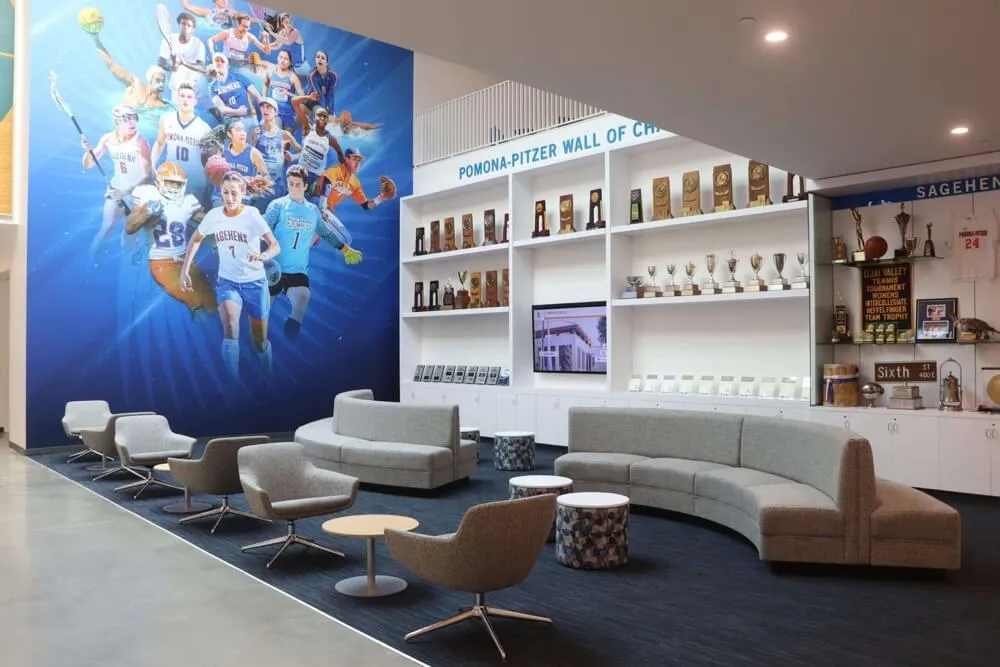
Experience centers blend physical artifacts with digital content for comprehensive engagement
Organizational Sustainability
Technology platforms require sustained commitment beyond initial deployment.
Clear Ownership and Responsibility
Somebody must own ensuring experience centers remain current and functional:
Content Management - Assign specific staff members or roles responsible for regular content updates, event information maintenance, recognition content additions, and quality control. Without clear ownership, content inevitably becomes outdated.
Technical Administration - IT staff or vendor support teams must own system monitoring, troubleshooting hardware issues, software updates, user account management, and integration maintenance. Define support models before deployment.
Strategic Oversight - Executive or senior staff should provide periodic review ensuring experience centers serve organizational objectives, receive adequate resources, maintain appropriate priority, and evolve as organizational needs and technology capabilities develop.
Cross-Functional Coordination - Experience centers touch multiple departments including marketing, operations, IT, facilities, and fan experience. Regular coordination meetings ensure alignment and address issues requiring collaborative resolution.
Resource Commitment
Beyond technology costs, sustained operations require ongoing investment:
Staff Time - Content updates, quality control, system monitoring, user support, and strategic planning all require staff hours that must be planned and allocated rather than assumed to happen automatically.
Content Production - Photography, videography, writing, editing, and graphic design for new content require either in-house resources or external service contracts. Budget for ongoing content development not just initial creation.
Technical Support - Whether internal IT staff or vendor support agreements, responsive technical assistance ensures issues are resolved quickly before small problems become major disruptions.
Enhancement Investment - Plan for periodic feature additions, hardware refresh cycles, software upgrades, and capacity expansion ensuring experience centers remain current as technology evolves and organizational needs grow.
Organizations achieving long-term success view experience centers as programs requiring continuous commitment rather than one-time projects completed at installation.
Documentation and Training
Sustainability requires knowledge transfer beyond individuals:
Operational Documentation - Written procedures for common tasks, troubleshooting guides for routine issues, content standards and templates, approval workflows, and contact information for technical support ensure operations continue as staff transitions occur.
Training Materials - Video tutorials, step-by-step guides, and reference documentation helping new staff learn content management systems, understand organizational standards, and perform routine tasks independently.
Institutional Knowledge - Documenting rationale for design decisions, integration approaches, vendor selection criteria, and lessons learned creates institutional memory preventing repeated mistakes and preserving understanding as personnel change.
Comprehensive documentation transforms experience center expertise from tribal knowledge residing with specific individuals into organizational capability that persists through staffing transitions.
Explore approaches for long-term sustainability of digital recognition programs through systematic planning and resource commitment.
Measurement and Continuous Improvement
Systematic assessment enables optimization and demonstrates value justifying continued investment.
Usage Analytics Review
Regular data review reveals optimization opportunities:
Monthly Metrics - Track total interactions, session duration trends, content performance changes, peak usage patterns, and anomalies requiring investigation. Monthly review cadence balances responsive adjustment with statistical significance.
Quarterly Analysis - Deeper assessment of strategic questions: Are experience centers achieving objectives? Which locations perform best and worst? What content gaps exist? How do usage patterns vary by event type, time of season, or audience demographics? What features or content additions would add most value?
Annual Evaluation - Comprehensive assessment reviewing full-year performance, comparing results across seasons, identifying major improvement opportunities, benchmarking against industry standards when available, and informing strategic planning for next cycle.
Stakeholder Feedback Collection
Quantitative analytics should be complemented by qualitative feedback:
Visitor Surveys - Brief intercept surveys asking visitors about satisfaction, ease of use, information found or not found, and suggestions for improvement. Digital surveys integrated into displays or mobile apps enable convenient feedback collection.
Staff Observations - Facility staff, ushers, and guest services personnel observe how visitors interact with displays, questions they ask, confusion points, and effectiveness gaps. Regular staff debriefs capture frontline insights analytics miss.
Focus Groups - Periodic structured discussions with representative visitor groups provide detailed feedback about experiences, preferences, and improvement ideas. Focus groups especially valuable when planning major changes or additions.
Social Media Monitoring - Tracking social media mentions of experience centers, shared photos or videos, complaints or compliments, and general sentiment reveals how implementations are perceived beyond facility visits.
Performance-Based Optimization
Insights should drive systematic improvement:
Content Refinement - Eliminate underperforming content, expand popular features, address common confusion points, and add information visitors frequently seek but can’t find.
Interface Improvements - Streamline navigation based on observed usage patterns, clarify confusing elements, improve search functionality based on query analysis, and enhance visual design addressing identified issues.
Feature Development - Add capabilities addressing unmet needs, integrate new data sources, expand coverage areas, and implement emerging technologies as they mature.
Hardware Adjustments - Relocate underutilized displays to better locations, add installations in high-demand areas, upgrade aging equipment, and optimize configurations based on usage data.
Systematic measurement and improvement distinguishes experience centers that deliver increasing value over time from static installations that gradually become outdated and irrelevant.
Conclusion: Transforming Stadium Environments Through Digital Experience Centers
Modern professional and collegiate sports venues have evolved far beyond simple game-watching spaces into comprehensive entertainment destinations where every aspect of visitor experience contributes to overall satisfaction, loyalty, and long-term engagement. New fan experience centers represent the physical manifestation of this evolution—dedicated implementations of interactive technology that inform, engage, celebrate, and guide visitors through increasingly complex facility environments while creating memorable experiences that justify premium pricing and encourage repeat attendance.
The strategies, technologies, and implementation approaches explored in this comprehensive guide demonstrate how organizations at every level can deploy digital experience centers that serve multiple simultaneous purposes: practical wayfinding reducing frustration and enabling discovery of amenities visitors might not find independently, comprehensive event information ensuring all fans access current schedules and details, recognition and heritage celebration connecting current success to historical excellence, future vision communication demonstrating organizational commitment to continuous improvement, and engagement experiences transforming utilitarian information into entertainment worthy of modern expectations.
Transform Your Venue with Interactive Experience Centers
Discover how Rocket Alumni Solutions enables professional teams, college programs, and sports facilities to create comprehensive digital experience centers that enhance fan engagement, celebrate achievement, provide essential information, and communicate organizational vision through purpose-built interactive technology designed specifically for venue applications.
Explore Experience Center SolutionsSolutions like Rocket Alumni Solutions provide proven platforms specifically designed for these applications, eliminating technical risk while enabling comprehensive functionality through intuitive content management, robust multimedia support, flexible integration capabilities, and sustained reliability appropriate for mission-critical venue operations. Purpose-built platforms accelerate implementation timelines, reduce total cost of ownership compared to custom development, and provide sustainable operations through vendor-managed infrastructure and support.
Organizations implementing experience centers most successfully approach deployments systematically: beginning with clear objectives and stakeholder alignment, selecting appropriate technology partnerships, developing compelling launch content, deploying in strategic high-visibility locations, promoting proactively to drive awareness and usage, measuring performance against objectives, and committing to continuous improvement based on data and feedback. This systematic approach distinguishes transformational implementations from disappointing technology deployments that fail to achieve potential.
The investment in digital experience centers delivers measurable returns across multiple dimensions: operational efficiency gains reducing staff time answering repetitive questions, enhanced visitor satisfaction through improved navigation and discovery, revenue opportunities through promotional content and sponsor integration, brand building through heritage celebration and values communication, competitive differentiation from alternative entertainment options, and cultural impact strengthening connections between organizations and communities they serve.
Every fan walking through your gates deserves experiences worthy of their investment in tickets, travel, and time. Every achievement throughout your organization’s history deserves recognition celebrating contributions appropriately. Every facility improvement and organizational initiative deserves communication demonstrating commitment to excellence. Digital experience centers powered by solutions like Rocket Alumni Solutions make these comprehensive experiences achievable regardless of organizational size or technical sophistication.
Start planning your experience center implementation today. Whether enhancing existing facilities through distributed touchscreen installations, building dedicated experience zones in renovated spaces, or planning comprehensive technology integration for new construction, the proven platforms, implementation approaches, and best practices documented in this guide provide frameworks for creating engaging, sustainable systems that transform how fans experience your venue.
Your visitors’ expectations continue evolving as consumer technology advances and entertainment alternatives multiply. Experience centers represent strategic responses ensuring sports facilities remain relevant, engaging, and worthy of continued support from fans who could choose unlimited alternative experiences. Through thoughtful implementation combining appropriate technology, compelling content, strategic placement, sustained commitment, and continuous improvement, your organization can create experience centers that enhance every aspect of venue operations while building the lasting connections between fans and institutions that sustain programs across generations.
Ready to explore how digital experience centers can transform your venue? Learn more about interactive displays for sports facilities or discover comprehensive stadium technology implementation strategies that ensure successful deployments serving organizational objectives while delighting visitors through every interaction.































